




CJL900107
Members
-
Joined
-
Last visited
-
-
-
-
-
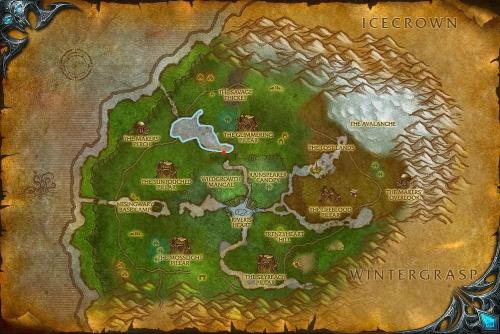 Hey wRobot Community, This is a FisherBot profile I made that flies around the north-west lake of Sholazar Basin where Nettlefish schools are located. Sholazar Basin is generally a gank heavy area, so I tried to stay away from main questing areas. Please use with caution. Thanks!
 -
-
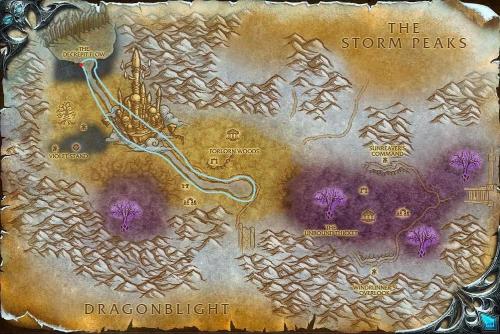 Hey wRobot Community, This is a FisherBot profile I made that flies around the central river of Crystalsong Forest where Glassfin Minnow schools are located.
 -
-
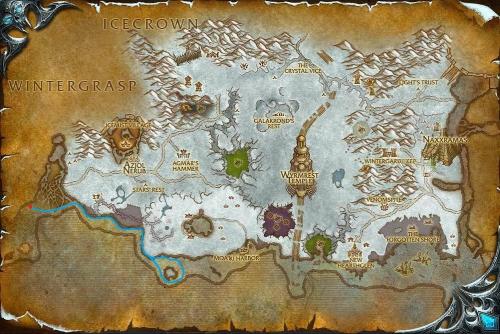 Hey wRobot Community, This is a FisherBot profile that flies around the south west shore of Dragonblight where Imperial Manta Ray schools are located.
 -
I've been having an issue with the Fight Class. When it attempts to apply poison to a weapon, it will sometimes delete my main hand weapon. This has happened three times from levels 1-50. Any suggestions?
-
Since the latest update, WRobot hasn't been taking any flight paths. It says it can't reach the Flight Master, temporarily black lists it and tries to run. I tried to download a plugin for Flight Masters, but it does the same for that as well. Anyone else having these issues or is it just me?

