



Skip to content
View in the app

A better way to browse. Learn more.

WRobot

A full-screen app on your home screen with push notifications, badges and more.

To install this app on iOS and iPadOS
  1. Tap the Share icon in Safari
  2. Scroll the menu and tap Add to Home Screen.
  3. Tap Add in the top-right corner.
To install this app on Android
  1. Tap the 3-dot menu (â‹®) in the top-right corner of the browser.
  2. Tap Add to Home screen or Install app.
  3. Confirm by tapping Install.

problem with connecting to the server

  • Version: All
  • Product: WRobot General
  • Type: Bug
  • Status: Fixed

Hello. There was a problem with connecting to the server. I added wrobot to the exceptions of all protection systems, but the problem remains. The first time this error came out yesterday. How to fix it?
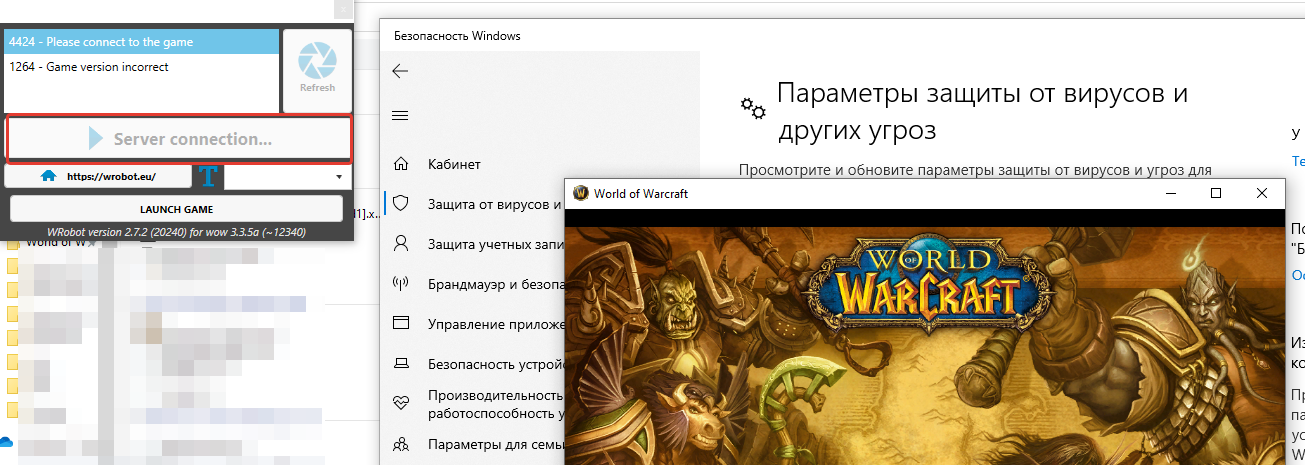
2022-06-24_11-13-05.png

User Feedback

Recommended Comments

Hello,
An incident has occurred on the authentication server (probably hardware).

I can't do anything at the moment, the hoster team is working on it.

I don't know for how long there is.

DarkMorc

Members

aight

tonyloks

Members
14 minutes ago, Droidz said:

Hello,
An incident has occurred on the authentication server (probably hardware).

I can't do anything at the moment, the hoster team is working on it.

I don't know for how long there is.

Understood, then everything is fine. Thanks for the reply. Waiting 😃

MrCeeJ

Elite user

Are there any updates? Is there a feed or something we can follow to know when it will be back up?

eLucious

Members

Do we get extensions on our subscriptions if this prolongs?

venom3140

Members

no updates yet?

lacomtesse

Members

ok we wait 😢

MrCeeJ

Elite user

7 hours later any news? how long does it take to re-deploy a server?

I'm working on it. I rented a new server to save time.

I'm installing (old one had failed motherboard and both hard drives, reason I was given: "The disjunction is due to a water leak on one of our network equipment" ).

It takes time, I start from scratch (reconfiguration, send data…).

The version for WOTLK should be available in the next few hours.

Sorry for the inconvenience

Uccy

Members
This week I lost my production server due to a severe power cut and the 2 power supplies didn't like it and had to go back to a PRA.
Good luck
And thank you in advance

MrCeeJ

Elite user

Thanks for the update, good luck getting the new server built! Lets hope the new place has a better plumbing🙂

Problem should solved (on all versions).

If you have an issue (authentication or pathfinder) let us know here.

Sorry for the inconvenience.

bio33

WRobot user

WRobot_7.3.5_26124 have problem with path now

Apollon245

Members

Problème de chemin 3.3.5 

MrCeeJ

Elite user
17 hours ago, Droidz said:

Problem should solved (on all versions).

If you have an issue (authentication or pathfinder) let us know here.

Sorry for the inconvenience.

One thing, the logging into the server is taking a long time (10s+), I don't know if you have changed how it works or if there is a built in delay / timeout or something. It makes testing code a pain as everytime I stop and restart the bot it now takes twice as long for it to load up and start running my code.

Blazeone

Members
3 hours ago, MrCeeJ said:

One thing, the logging into the server is taking a long time (10s+), I don't know if you have changed how it works or if there is a built in delay / timeout or something. It makes testing code a pain as everytime I stop and restart the bot it now takes twice as long for it to load up and start running my code.

I'm so happy its just not me. I have enough time to go use the bathroom and make a drink all before it connects to the game. 

sligq2x

Members

Wrobot for wow 7.3.5 26124 is working but it still has some issues with pathfinder, as a result characters can't move normally.

Hello,

23 hours ago, MrCeeJ said:

One thing, the logging into the server is taking a long time (10s+), I don't know if you have changed how it works or if there is a built in delay / timeout or something. It makes testing code a pain as everytime I stop and restart the bot it now takes twice as long for it to load up and start running my code.

I fixed a performance issue a few hours ago.  If you can tell me if your problem has been solved.

On 6/25/2022 at 2:24 AM, bio33 said:

WRobot_7.3.5_26124 have problem with path now

18 hours ago, sligq2x said:

Wrobot for wow 7.3.5 26124 is working but it still has some issues with pathfinder, as a result characters can't move normally.

If you can tell me if problem is fixed (now)

sligq2x

Members

Pathfinder is not fixed yet (wrobot for wow 7.3.5 26124)

Apollon245

Members

bonjour j'ai un souci avec mon bot stop et ne veux pas redémarré depuis se matin 

15 hours ago, sligq2x said:

Pathfinder is not fixed yet (wrobot for wow 7.3.5 26124)

Do you have a log of one of bugged session (with several bad paths) ?

2 hours ago, Apollon245 said:

bonjour j'ai un souci avec mon bot stop et ne veux pas redémarré depuis se matin 

Bonjour, avez vous un message d'erreur ? 

sligq2x

Members
4 hours ago, Droidz said:

Problem should be sovled

it works now, thanks

lacomtesse

Members

I think its again same problem?

and close. (Nothing)

fdsfdsfsfsf.PNG

Dreamful

Members

Same.

DarkMorc

Members

yea it worked after getting this error the first time, and now i got it 3 times, but it worked sometimes. but now the first time it doesnt work for 15 minutes straight

Finkledu

Members

Yeah same thing happening to me.  Server connection stays grey and then the window just closes and I never get to start the bot.

Dreamful

Members
50 minutes ago, Droidz said:

Hello,

I can't do anything. I am waiting for the intervention of the technical team of my host to find out more.

You ever think about to store the meshes locally and only do the auth serverside?
I mean we cant auth right now and the Pathfinder Server is down aswell so the whole bot does not work. Store it locally and only download it one time, you even had much lower Requests and save bandwidth for your hoster. Pretty much like Honorbuddy did in the past, he downloaded the meshes one time and stored it locally.

Problem should resovled, I hope that he will not happen again.

Message of my hoster (auto translate) :

Hello,

The operation is over.

This operation was completed on 2022-07-19 20:09:25 CEST (UTC +02:00)

Here are the details of this operation:
HARD reboot
Date 2022-07-19 18:12:43 CEST (UTC +02:00), Reboot HARD:
Here is the detail of the intervention carried out:
Freezer server. No keyboard response.

Actions taken:
Hardware restart of the server.

Results:
Boot OK. Server on 'login'. Ping OK, services started.


stukas

Members

BUMP problem still up


Create an account or sign in to comment

Account

Navigation

Search

Search

Configure browser push notifications

Chrome (Android)
  1. Tap the lock icon next to the address bar.
  2. Tap Permissions → Notifications.
  3. Adjust your preference.
Chrome (Desktop)
  1. Click the padlock icon in the address bar.
  2. Select Site settings.
  3. Find Notifications and adjust your preference.