



Skip to content
View in the app

A better way to browse. Learn more.

WRobot

A full-screen app on your home screen with push notifications, badges and more.

To install this app on iOS and iPadOS
  1. Tap the Share icon in Safari
  2. Scroll the menu and tap Add to Home Screen.
  3. Tap Add in the top-right corner.
To install this app on Android
  1. Tap the 3-dot menu (⋮) in the top-right corner of the browser.
  2. Tap Add to Home screen or Install app.
  3. Confirm by tapping Install.

[Free] TrainSkillsOverride 1.0.3

(1 review)

3 Screenshots

This is an early version of a free plugin that I'm developing which removes the default trainers state and adds it's own.
This is so you can choose which spells to learn when leveling up and not waste gold on the useless ones.

It also has a profession learning state where it will check to see if you are able to get the next level of a profession, go to the trainer and learn it.
Example uses would be gathering professions, set it going and when it reaches a certain level it will go train and go back to gathering.
This still needs some work though, at the moment it attempts to do this for primary professions up to level 300 and up to level 150 for secondary professions (due to the need for books).

It uses the WRobot NPC database so make sure your trainers are in there.

Settings include:

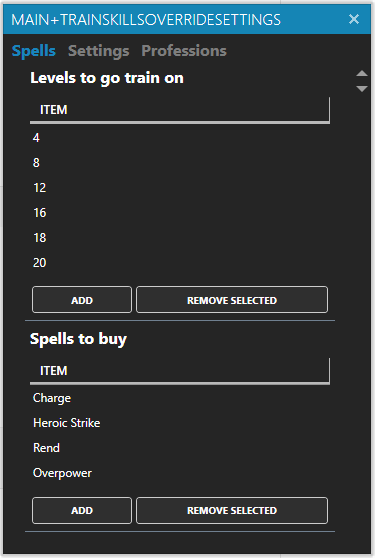
  • A grid for levels to train at
  • A grid for the spells you want to learn (Spelling is important!)
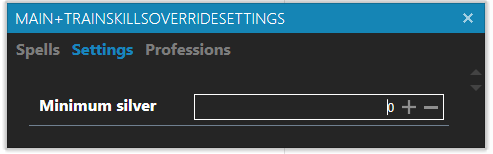
  • A minimum amount of silver to have before going to train
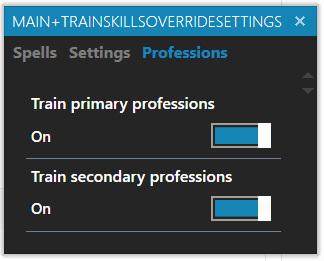
  • Enable/Disable learning primary professions
  • Enable/Disable learning secondary professions

If no levels are added to the grid it will just go every 2 levels.

Possible features at some point:

  • Disenchanting
  • Crafting Professions (Alchemy, Tailoring, First aid, etc.) if you have the materials

Let me know if you have issues.

What's New in Version 1.0.3

Released

Messed up my previous updated of adding the states when class training is disabled. Should be okay now.


User Feedback

Recommended Comments

thxgod1

Members

great work @Marsbar , thank you

is it maybe possible to disable trainlevel and specific spells, and only activate profession training? Is trainlevel/spell disabled when i  leave it empty?

greetings

Marsbar

Elite user

2 minutes ago, thxgod1 said:

great work @Marsbar , thank you

is it maybe possible to disable trainlevel and specific spells, and only activate profession training? Is trainlevel/spell disabled when i  leave it empty?

greetings

Thanks! Good suggestion @thxgod1 I'll add an option to disable class training.

TheSmokie

Banned

Just a idea, for skinning and mining. have you're thought about adding a buy knife and mining pick and add a do not sale to it?

Marsbar

Elite user

7 hours ago, The Smokie. said:

Just a idea, for skinning and mining. have you're thought about adding a buy knife and mining pick and add a do not sale to it?

I see where you're coming from but I want this to be a plugin more than an all in one solution. Generally a profile would do that part. Also learning the actual profession would probably be done by the user.

TheSmokie

Banned

Okay, that’s good. ?

spacecowboy

Members

For some reason It does not go training at all when activated for the WOTLK client. I have added train levels every 4 level.

Marsbar

Elite user

On 6/23/2019 at 9:26 AM, spacecowboy said:

For some reason It does not go training at all when activated for the WOTLK client. I have added train levels every 4 level.

I tested on WotLK and it was working for me. The logic for the state is: Have I leveled up? and does my level match any of the levels set in the settings? If those are true, it should go to train. I'll test it again later today to confirm.

spacecowboy

Members

Hmm. Im using it together with HBM from Schaka, maybe they interfere with each other ?

thxgod1

Members

Second proffession can only be upped at level 20... first profession is fine before. bot gets stuck there. Not sure if you can do something with that information ? would it be possible to implement level requirement for proffession training? greetings

Create an account or sign in to comment

Account

Navigation

Search

Search

Configure browser push notifications

Chrome (Android)
  1. Tap the lock icon next to the address bar.
  2. Tap Permissions → Notifications.
  3. Adjust your preference.
Chrome (Desktop)
  1. Click the padlock icon in the address bar.
  2. Select Site settings.
  3. Find Notifications and adjust your preference.