Droidz
Administrators
-
Joined
-
Last visited
Everything posted by Droidz
-
J'ai pris note du problème, je reviens vers vous quand le problème est résolu ou que j'ai une solution.
-
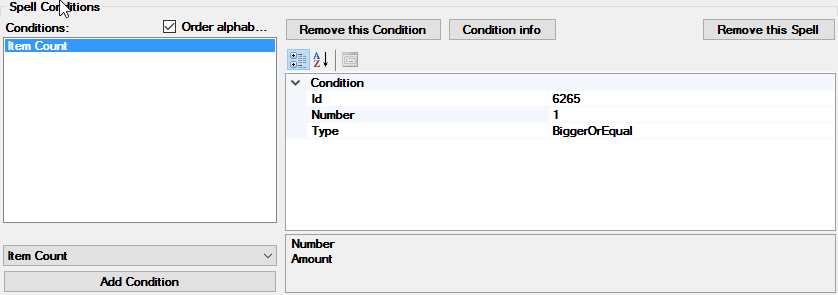
You can also use condition "Item Count":
-
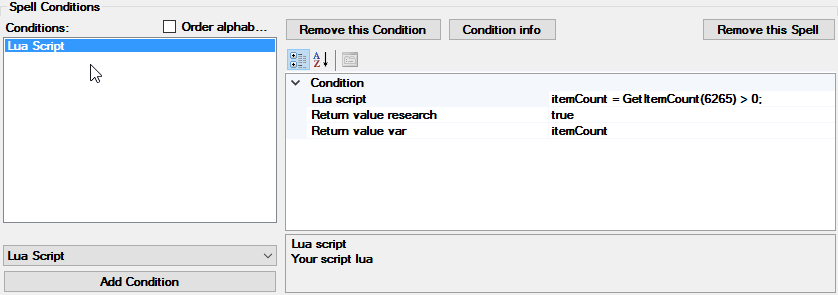
Hello, why not use http://wowwiki.wikia.com/wiki/API_GetItemCount like this: ret = GetItemCount(6265) > 0; You use it like this in your fightclass:
-
Hello, http://wrobot.eu/forums/topic/1381-repairinstall-wrobot/?do=findComment&comment=966 step 4, 6, 7, if your problem is not resolved please share your log file
-
Bonjour. Les profils ce trouve http://wrobot.eu/files/category/8-pet-battles/ . Vous pouvez également en faite vous même où utiliser le bot automatin (il fonctionne sans profil)
-
It is written in subscription description on the store.
-
Hello, At the end of your subscription, we will send you an invoice with renewal link to remind you to renew your subscription. We will not automatically renew your subscription.
-
Bonjour, WRobot attaque les membres de la faction opposé uniquement quand il est attaqué (il ne fait que ce défendre). Il n'y à pas d'option pour éviter cela.
-
Can share screenshot of npc window please (where bot stuck).
-
-
Hello, some wow addon select best quest reward: http://mods.curse.com/addons/wow/autoturnin#t1:other-downloads
-
Hello, http://wrobot.eu/forums/topic/1381-repairinstall-wrobot/?do=findComment&comment=966 step 4, 6, 7
-
Bonjour, Pouvez vous m'envoyer (par message privé, ce fichier contient le nom de votre personnage) le texte généré par: Onglet "Tools" > "Development Tools" > bouton "Memory informations", cliquer sur le bouton (memory...) quand vous avez http://www.wowhead.com/spell=81141/crimson-scourge d'actif. ps: Pour résoudre le problème vous pouvez essayer avec lua (lua condition): http://wrobot.eu/forums/topic/1118-snippets-of-lua-codes-for-fightclass/?do=findComment&comment=6933
-
Bonjour, essayé d'ajouter l'entry id de l'objet dans "General settings" > "Enter advanced settings..." > onglet "Looting and Farm..." > "Harvest objects...". ps: Proche de la porte, vous pouvez également essayé d'éxécuter ce code c#: wManager.Wow.Bot.Tasks.GoToTask.ToPositionAndIntecractWithGameObject(wManager.Wow.ObjectManager.ObjectManager.Me.Position, 201761); (dans un profil quête avec un step de type 'RunCode' ou dans un profil grinder avec http://wrobot.eu/forums/topic/2202-profile-positions-and-action-column/ )
-
Hello,try to launch WRobot with shortcut "WRobot No DX"
-
Hello, it is pet battles profile? http://www.wowhead.com/spell=125439/revive-battle-pets is ready? You can try to disable option "Pet battle" in product settings
-
Hello, sorry, problem resolved.
-
Bonjour, pouvez vous partager le fichier log complet?
-
Can you share your profile please (you can send me profile by private message if you don't want share it in public). I don't understand why Wrobot want use "Long move" for 6 yards, can you try to install wrobot in new folder with default settings and test your profile (keep your old WRobot install).
-
Install SlimDX (4.0 X86) to fix this error.
-
Hello, I am not sure to understand, but you can try wow addon like http://mods.curse.com/addons/wow/autoconfirmroll or http://mods.curse.com/addons/wow/need-primal-spirits
-
Problem resolved, If you can wait next update
-
Can you share screenshot of your product settings and your log file please.
-
Hello, can you share screenshot of your problem please.
-
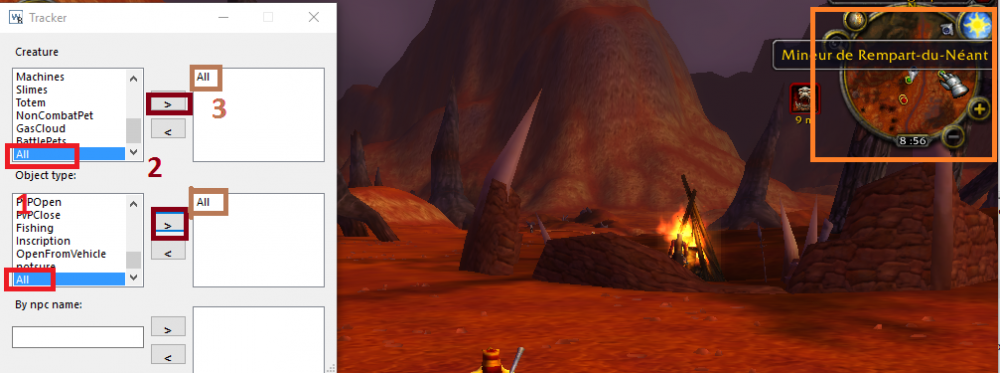
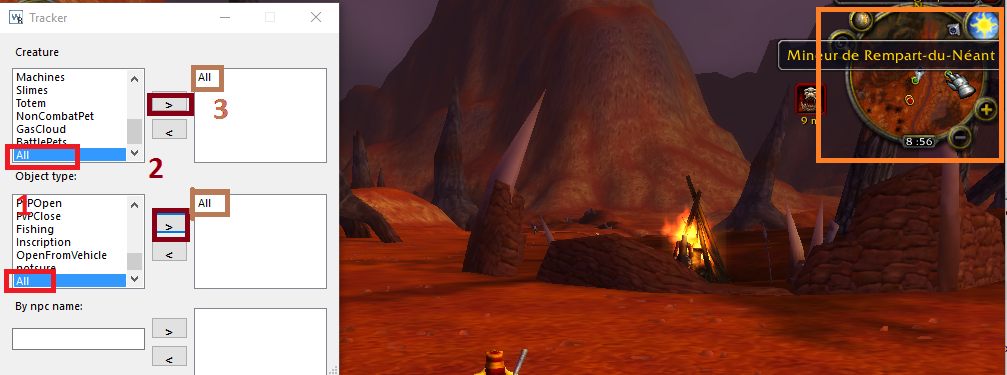
Hello it is to track in wow minimap object/npc by type: