fengshibang
Members
-
Joined
-
Last visited
-
你什么垃圾,不说就不说,哪凉快去哪呆着
-
-
-
It doesn't work.You can't log in to the game using only the official client
-
Waiting for answer
-
-
用着盗版的,来正版群里问,就不怕被封号吗?
-
-
Thanks all.I have created a plugins to deal with it.
-
他们知道的都会说的
-
自己做好了,只是问问他们思路而已
-
-
-
--[[ Options start here ]] local M="CHAT_MSG_SYSTEM" function MS(msg) SendChatMessage(msg) end function yz() if (event==M) then local zj=string.find(arg1, "答题时间") if(zj) then end local s1=arg1 local zj=string.find(s1, "+") if(zj) then local s=arg1 local z="+" local y="?=" local param1, param2 = string.find(s, z) local m = string.len(s) s=string.sub(s,param2+1) local ts = string.reverse(s) local param1, param2 = string.find(ts, y) local m = string.len(s) - param2 + 1 local hou if (y == false) then hou = string.sub(s, m+1, string.len(s)) else hou = string.sub(s, 1-1, m-1) end local s=arg1 local z=":" local y="+" local param1, param2 = string.find(s, z) local m = string.len(s) s=string.sub(s,param2+1) local ts = string.reverse(s) local param1, param2 = string.find(ts, y) local m = string.len(s) - param2 + 1 local qian if (strchar == false) then qian = string.sub(s, m+11, string.len(s)) else qian = string.sub(s, 1+10, m-1) end print(qian,"+",hou,"=",qian+hou) MS(tostring(qian+hou)) else local s=arg1 local z="-" local y="?=" local param1, param2 = string.find(s, z) local m = string.len(s) s=string.sub(s,param2+1) local ts = string.reverse(s) local param1, param2 = string.find(ts, y) local m = string.len(s) - param2 + 1 local hou if (strchar == false) then hou = string.sub(s, m+1, string.len(s)) else hou = string.sub(s, 1-1, m-1) end local s=arg1 local z=":" local y="-" local param1, param2 = string.find(s, z) local m = string.len(s) s=string.sub(s,param2+1) local ts = string.reverse(s) local param1, param2 = string.find(ts, y) local m = string.len(s) - param2 + 1 local qian if (strchar == false) then qian = string.sub(s, m+10, string.len(s)) else qian = string.sub(s, 1+10, m-1) end print(qian,"-",hou,"=",qian-hou) MS(tostring(qian-hou)) end end end local F=CreateFrame("Frame") F:SetScript("OnEvent",yz) F:RegisterEvent(M)
-
My version of the game is 2.4.3. This statement does not work properly:DEFAULT_CHAT_FRAME:GetMessageInfo(i).I checked some plug-ins written by others.His solution is to make a wow plug-in. This event "CHAT_MSG_SYSTEM" is used, and then the text is in arg1. How can wrobot extract arg1 to get the text?
-
It's the System Channel. When I turn off the System Channel Display, it's no longer displayed.
-
It's the System Channel. When I turn off the System Channel Display, it's no longer displayed.
-
i really need your help.if you know,please tell me,thank you
-
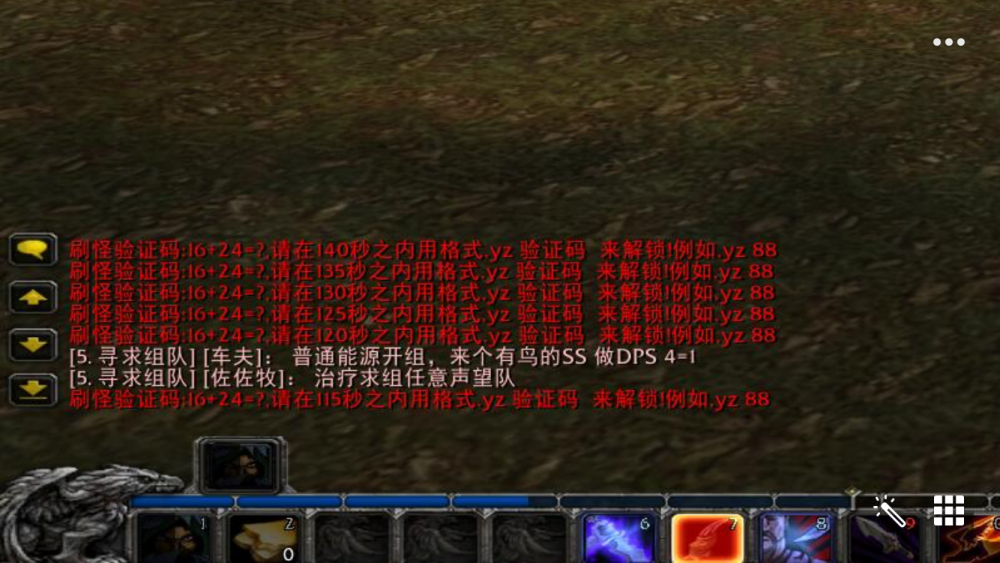
In my server, the system will pop up the following text when botting, asking for the calculation formula and answer. In order to solve this problem, I want to make a plugin, now I need to know how to get text information and text events. Can someone help me, please
-
ty it works