




Skip to content
View in the app

A better way to browse. Learn more.

WRobot

A full-screen app on your home screen with push notifications, badges and more.

To install this app on iOS and iPadOS
  1. Tap the Share icon in Safari
  2. Scroll the menu and tap Add to Home Screen.
  3. Tap Add in the top-right corner.
To install this app on Android
  1. Tap the 3-dot menu (⋮) in the top-right corner of the browser.
  2. Tap Add to Home screen or Install app.
  3. Confirm by tapping Install.

GoToClick 17.11.6.26504

(0 reviews)

1 Screenshot

GoToClick - a WRotation plugin
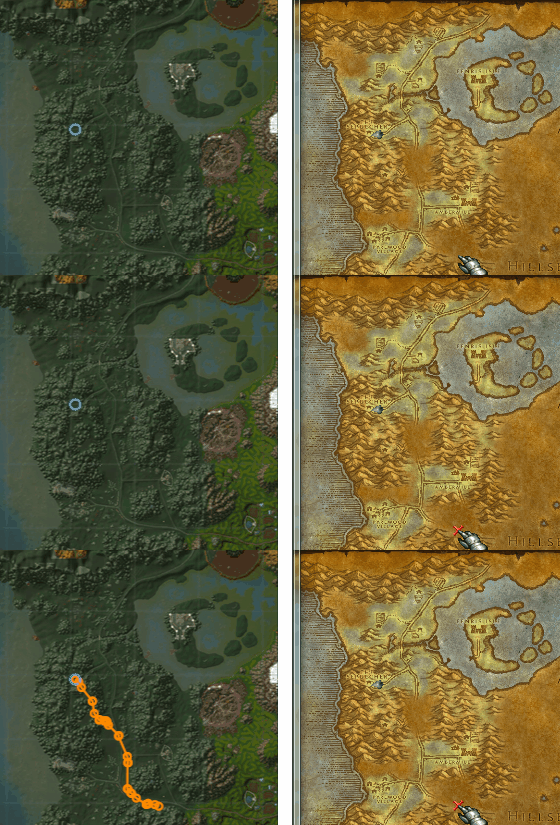
ClickToGo.gif.cb07c7cb9f4631667279f8db4d559db8.gif


This plugin enables the user to move to a location by a click on the Wow map. To move on, just hold ctrl and click!


Note:                                                                                                           

               - The plugin itself is a port from another bot credits can be found in the file.

               - The plugin doesn't support travel to other continents(api limitations),         

                but supports typical actions like using taxi or unstuck.                                 

- The plugin requires the latest version of WoWDb to work!             

It can be obtained here.                                                                     

What's New in Version 17.11.6.26504

Released

- api update

User Feedback

Recommended Comments

Apexx

Elite user

Hey reapler, I have followed all instructions to install this Plugin, all three files where they should be. I am getting the following error:
 

[E] 10:15:46 - [ClickToGo] Error @Initialize:
System.TypeLoadException: Could not load type 'DatabaseManager.WoW.DbWorldMapArea' from assembly 'DatabaseManager, Version=1.0.6438.36262, Culture=neutral, PublicKeyToken=null'.
   at Main.Transform(WorldMapCoord wowCoords, Single zReference)
   at Main.Pulse()
   at Main.Initialize()


tonycali

Members

Is this 3.3.5 Wotlk and up only plugin or does it work on 2.4.3  and elysium?.

reapler

Elite user

@tonycali It doesn't work for versions below, it needs a different lua code.

hanyuhyhy

Members

i tried to use it on wow 7.3.0.24931, but the character never goes to the point I clicked. It always goes somewhere else

reapler

Elite user

Hello @hanyuhyhy, as i stated the database or used lua is for 3.3.5a.

Everything under or above this version doesn't working correctly or working partially(coordinates are translated differently on some maps).

But thank you anyways to tried it on legion.

Apexx

Elite user

Hey reapler, thanks again for a great plugin. Is there any way to disable click-to-move in the game settings, until the user Ctrl+Clicks the map, then enable it. Then maybe once the player has reached its destination disable click-to-move again?

reapler

Elite user

(edited)

7 hours ago, Apexx said:

Hey reapler, thanks again for a great plugin. Is there any way to disable click-to-move in the game settings, until the user Ctrl+Clicks the map, then enable it. Then maybe once the player has reached its destination disable click-to-move again?

Thank you for your suggestion, i'll consider to add it, if i'm working on it again.

Edited by reapler

Shiinu

Members

Updated my Wrobot folder with both WOW DB files. One into "Bin" and one into "Data" folder.. plugin into plugin folder. Restarted wow and Wrobot. 
I can see the red cross when Ctrl + LeftClick on Map.. but my char doesnt move.. Manage Character Movement in Wrotation mode is enabled. 

My Log File is added.

Thanks in advance!
 

12 Nov 2017 11H46.log.html

zenciboy

Members

is there any other place I can download this database?

Dreamful

Members

Veeeeery cool plugin thanks!

begliado

Members

Hey, the bot seems to only move a bit in random directions and seems to pause and resume every seconds, any clues ?

Paultimate

Members

Note to future self, This need to be in wrotation mode, and you ctrl+double-left click the map inside wrobot (why the misleading gif?) to get this to go (after pressing play).


After that it works well

kojo

Members

can i remove the waypoint somehow?

Create an account or sign in to comment

Account

Navigation

Search

Search

Configure browser push notifications

Chrome (Android)
  1. Tap the lock icon next to the address bar.
  2. Tap Permissions → Notifications.
  3. Adjust your preference.
Chrome (Desktop)
  1. Click the padlock icon in the address bar.
  2. Select Site settings.
  3. Find Notifications and adjust your preference.
