



Skip to content
View in the app

A better way to browse. Learn more.

WRobot

A full-screen app on your home screen with push notifications, badges and more.

To install this app on iOS and iPadOS
  1. Tap the Share icon in Safari
  2. Scroll the menu and tap Add to Home Screen.
  3. Tap Add in the top-right corner.
To install this app on Android
  1. Tap the 3-dot menu (⋮) in the top-right corner of the browser.
  2. Tap Add to Home screen or Install app.
  3. Confirm by tapping Install.

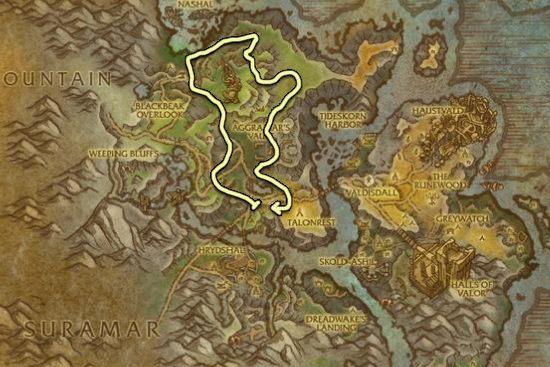
(Expanded) Stormheim - Herb and Mine (Skinnable Mobs) 2.1

(9 reviews)

3 Screenshots

Update: 2.0 released, see below for details. (Will be constantly checking this thread for bugfixes.)

If you need Dreamleaf, try my grinder here.

If you like my profiles and want to see more, feel free to buy me a coffee.

Quote

I am currently recording the full path right now to double-check for bugs and issues, but your help is needed! If you run into an issue or you die, please comment below with a description of the bug/issue/death and a screenshot of the location it occurred.

____________________________

Closest flight point for pathing to start is "Stormtorn Foothills", which is neutral (Horde and Alliance).

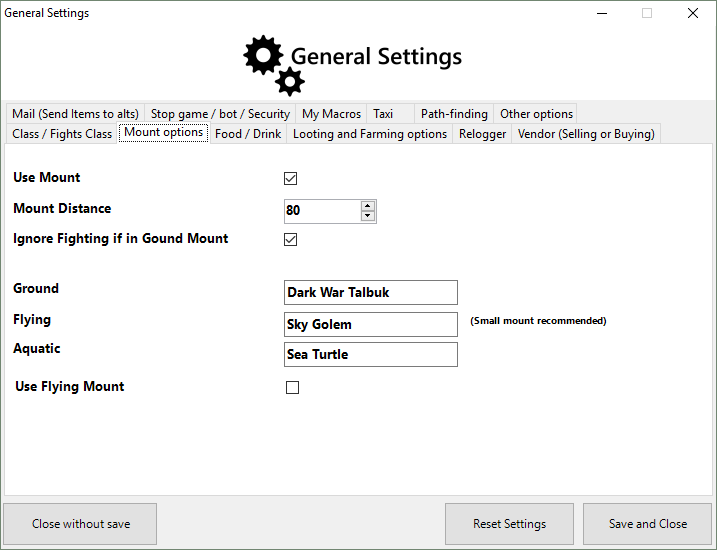
I have expanded this profile. This pathing does require your bot to run through a lot of mobs, highly recommend that you select "Ignore Mobs While in Ground Mount" option found in "Advanced Settings" under "Mount Options" (refer to the additional screenshot for visual assistance).

Obtainable items on this path:

  • Skinnable: Stonehide Leather (Wolves) and Stormscale (Dragons) -- (Note: make sure you have "Skin/Gather/Mine Mobs" turned on in your settings to take advantage of this option). *Note: Having this option toggled on can also cause your bot to attempt to skin dead NPC animals that cannot yield leather.
  • Herbalism: Fjarnskaggl
  • Mining: Leystone and Felslate

This path also takes you near a couple of rares in the area. Please make sure that your character is equip to handle these encounters. The pathing does try to avoid them, but there is a chance they will aggro (and believe me, they will).

____________________________

What's New in Version 1.0.0

Released

No changelog available for this version.

User Feedback

You may only provide a review once you have downloaded the file.


have some fall problems but it's okey^^

   0 of 1 member found this review helpful 0 / 1 member

Pretty good route, I got stuck in this point (inside a river):

30 3156,594 2310,055 209,3271 Troll_Raid 3156,594 ; 2310,055 ; 209,3271 ; "None"

   7 of 8 members found this review helpful 7 / 8 members


The route has a problem to fall at this location 43.71 - 63.57

   2 of 3 members found this review helpful 2 / 3 members

Never got stuck and good farming, good work <3

Guest

Guest

   2 of 3 members found this review helpful 2 / 3 members

Works like a charm. 10/10 thx dude for this profile.

   3 of 4 members found this review helpful 3 / 4 members

I can vouch for this profile I've made over 500KG in the past month so far this week I have not botted as much but im at nearly a million gold started the xpack with 23K! Plan on keep using it :D 


B5cdPWC.png

Guest

Guest

   3 of 4 members found this review helpful 3 / 4 members

very good route. and i mean very good. especially in middle of night(herb)

   3 of 4 members found this review helpful 3 / 4 members

Didnt got stuck in 1 hour, died 2 times (could be worse), good for mining but could be better i guess, as the developper said " I will be working on expanding this profile to cover the majority of the zone for maximum profil"
So it's a good profil but cant wait to a better optimized version, thanks for sharing this one.

   3 of 4 members found this review helpful 3 / 4 members

Averaging 100-110 farms/h  w/ Herbalism and Mining. High pop pvp realm

Died a few times, never got stuck. ilvl 715


Account

Navigation

Search

Search

Configure browser push notifications

Chrome (Android)
  1. Tap the lock icon next to the address bar.
  2. Tap Permissions → Notifications.
  3. Adjust your preference.
Chrome (Desktop)
  1. Click the padlock icon in the address bar.
  2. Select Site settings.
  3. Find Notifications and adjust your preference.