




Droidz
Administrators
-
Joined
-
Last visited
Everything posted by Droidz
-
Hello, to avoid to jump you can try also to: wManager.wManagerSetting.CurrentSetting.AvoidWallWithRays = false; For precision movement you can: wManager.Wow.Helpers.ClickToMove.CGPlayer_C__ClickToMove(position.X, position.Y, position.Z, Int128.Zero(), (int)wManager.Wow.Enums.ClickToMoveType.Move, 0.5f); OR wManager.Wow.Helpers.MovementManager.MoveTo(new Vector3(x, y, z)); Code for quest "Enigmatic" (replied by private message, but this can help): if (wManager.Wow.ObjectManager.ObjectManager.Me.HaveBuff(219247)) { var tile = wManager.Wow.ObjectManager.ObjectManager.GetObjectWoWAreaTrigger() .Where(u => u != null && u.IsValid && (u.SpellID == 219246 || u.SpellID == 219262)) .OrderBy(u => u.Position.DistanceTo(wManager.Wow.ObjectManager.ObjectManager.Me.Position)) .FirstOrDefault(); if (tile != null) { var loc = tile.Position; if (loc.DistanceTo(ObjectManager.ObjectManager.Me.Position) > 1.5) { MoveTo(loc); } } }
-
Hello, in general settings you can try to put "Max units near" at 0. But not easy way to skip node if you are in combat.
-
Hello, http://wrobot.eu/forums/topic/4087-discord-channel/
-
-
Hello, I'll not add this command. But you can try to force regen with: wManager.wManagerSetting.CurrentSetting.FoodPercent = 95; wManager.wManagerSetting.CurrentSetting.DrinkPercent = 95; (don't forget to restore default settings)
-
Hello, Can you share your log file please (http://wrobot.eu/forums/topic/1779-how-to-post-your-log-file-with-your-topic/).
-
Hello, you seem to get problem with " LootFilter " (it is an WRobot plugin?) Try to reinstall WRobot, if your problem is not resolved: http://wrobot.eu/forums/topic/1381-repairinstall-wrobot/#comment-966 (try also to reinstall framework)
-
Hello, WRobot was never detected. Yes you can use WRobot only for rotations (With 'WRotation' product).
-
Hello, do you have repair npc in your NPC DB (tab "Tools") or in your profile.
-
Changed Status to Added Changed Version to All
-
Hello, if you can wait next update.
-
-
Hello, You can use this plugin: http://wrobot.eu/files/file/517-potion-of-luck/ , edit it with notepad and replace id by your id. You can also use "My Macro" in advanced general settings. Or, if you want add it in your fightclass, in "Spell Settings" use "Timer", activate "Not spell, is lua script" and use this code is spell name: http://wrobot.eu/forums/topic/1688-lua-and-multi-language-support/ ps: http://wrobot.eu/forums/topic/2351-use-potionbuffitem-periodically/
-
Hello, do you have add this condition:
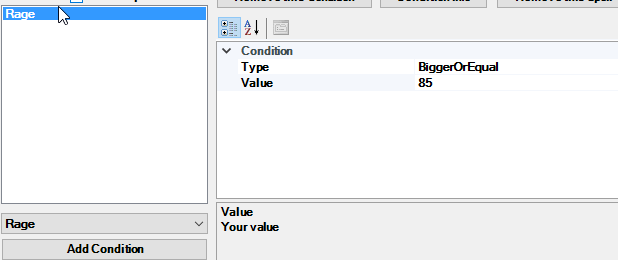
-
In 'Fisherbot' product settings.
-
Hello, I'll not add vanilla support
-
Hello, of course you can run WRobot (if he has problem, I stop WRobot login server) http://wrobot.eu/forums/topic/4030-new-wow-version/?do=findComment&comment=18719
-
There is little chance that Bliz target your figth class. You can use a global variable name used in legal Wow addons to avoid this problem (or C# code to read chat).
-
-
Hello, test.xml (not tested)
-
Can you check if in tab "Tools" > "Taxi DB" flightmasters position are correct?
-
Sorry, if you can wait next update.
-
Yes, you can put fake battlenet account and connect to Wow manually.
-
Try to remove file 'WRobot\Settings\WRobotGlobalSetting.xml', if this don't works try to reinstall WRobot in new folder.
-

