Droidz
Administrators
-
Joined
-
Last visited
Everything posted by Droidz
-
How do I renew the subscription?
-
How to use my license key to unlock WRobot?
-
Where is my license key?
-
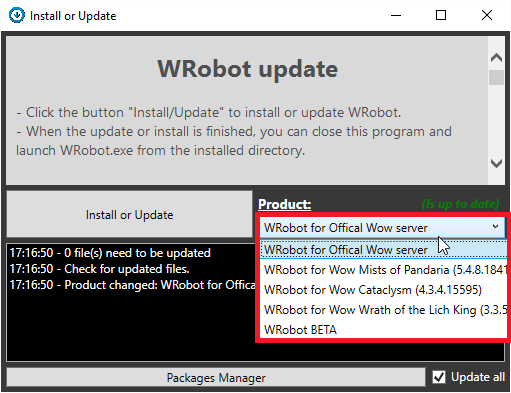
How to install WRobot?
-
In next days.
-
Hello, http://wrobot.eu/forums/topic/1381-repairinstall-wrobot/#comment-966 step 14
-
Hello, I have never try, but I don't think than WRobot works correctly with Wine on linux. But you can run WRobot and wow in Windows virtual machine.
-
Hello, http://wrobot.eu/forums/topic/1381-repairinstall-wrobot/#comment-966 steps 6, 7, 10, 14, 15
-
can you share your fightclass
-
In CastSpellByNameOn you need to put lua unit id (not unit name) To don't stop move, you can try: Interact.InteractGameObject(partyMember.GetBaseAddress, false, true);
-
-
Dump all quests in "Quests log" with lua ret = ''; local numEntries, numQuests = GetNumQuestLogEntries(); for questLog = 1, numEntries do local questTitle, _, _, _, _, _, _, id = GetQuestLogTitle(questLog); if id > 0 and questTitle then local q = '\n================='; q = q .. '\n' .. tostring(questTitle) .. ' (' .. id .. ')'; local numObjectives = GetNumQuestLeaderBoards(questLog); for i=1,numObjectives do local description, objectiveType, isCompleted = GetQuestLogLeaderBoard(i,questLog); if description then q = q .. '\nObjective count: ' .. i .. ', Description: ' .. tostring(description) .. ', ObjectiveType: ' .. tostring(objectiveType) .. ', IsCompleted: ' .. tostring(isCompleted); end end q = q .. '\n================='; print(q); ret = ret .. q; end end Go to WRobot tab "Tools" > "Development Tools" > paste this lua code in textbox and click on button "Lua (return value in 'ret')"
-
-
-
Seem not stop fight: 2016-09-09_14-15-52.mp4
-
I have found this profile: https://www.thebuddyforum.com/honorbuddy-forum/honorbuddy-profiles/267654-world-quests-wip.html Converted for WRobot: TestWorldQuest.xml (not tested) Class code: using System; using System.Collections.Generic; using System.Linq; using robotManager.Helpful; using wManager.Wow.Class; using wManager.Wow.Enums; using wManager.Wow.Helpers; public class WorldQuestData { public int ID; public string Name; public System.DateTime ExpireTime; } public class WorldQuestInfo : QuestClass { public WorldQuestInfo() { Name = "WorldQuestInfo"; } static List<WorldQuestData> _cache = new List<WorldQuestData>(); static internal bool _dirty = true; static internal bool _setup = false; static WorldQuestInfo() { Setup(); } public static void Setup() { if (_setup) return; EventsLua.AttachEventLua(LuaEventsId.WORLD_MAP_UPDATE, m => WorldQuestMarkDirty()); EventsLua.AttachEventLua(LuaEventsId.SUPER_TRACKED_QUEST_CHANGED, m => WorldQuestMarkDirty()); EventsLua.AttachEventLua(LuaEventsId.WORLD_QUEST_COMPLETED_BY_SPELL, m => WorldQuestMarkDirty()); UpdateWorldQuests(); _setup = true; } public static void WorldQuestMarkDirty() { _dirty = true; } public static bool HasWorldQuest(int questid) { UpdateWorldQuests(); var quest = _cache.FirstOrDefault(q => q.ID == questid); if (quest == null || quest.ExpireTime <= System.DateTime.UtcNow) return false; return true; } public static void UpdateWorldQuests() { if (!_dirty) return; _cache = new List<WorldQuestData>(); int BrokenIslesMapArea = 1007; var numZones = Lua.LuaDoString<int>(string.Format("return C_MapCanvas.GetNumZones({0});", BrokenIslesMapArea)); for (int i = 1; i < numZones; ++i) { var zoneID = Lua.LuaDoString<int>(string.Format("local zoneMapID, zoneName, zoneDepth, left, right, top, bottom = C_MapCanvas.GetZoneInfo({0}, {1}); return zoneMapID;", BrokenIslesMapArea, i)); var zoneName = Lua.LuaDoString<string>(string.Format("local zoneMapID, zoneName, zoneDepth, left, right, top, bottom = C_MapCanvas.GetZoneInfo({0}, {1}); return zoneName;", BrokenIslesMapArea, i)); var zoneDepth = Lua.LuaDoString<int>(string.Format("local zoneMapID, zoneName, zoneDepth, left, right, top, bottom = C_MapCanvas.GetZoneInfo({0}, {1}); return zoneDepth;", BrokenIslesMapArea, i)); if (zoneDepth > 1) //Do not look at subzones { Logging.WriteDebug(string.Format("[WorldQuestInfo] Ignoring {0} ({1}) as ZoneDepth > 1 ({2})", zoneID, zoneName, zoneDepth)); continue; } string toRun = string.Format(@" local questids = ''; local taskInfo = C_TaskQuest.GetQuestsForPlayerByMapID({0}, {1}); if taskInfo then for i, info in ipairs(taskInfo) do if HaveQuestData(info.questId) then if QuestMapFrame_IsQuestWorldQuest(info.questId) then questids = questids .. info.questId .. '#LUASEPARATOR#'; end end end end return questids; ".Replace("#LUASEPARATOR#", Lua.ListSeparator), zoneID, BrokenIslesMapArea); var questids = Lua.LuaDoString<List<int>>(toRun); foreach (var questid in questids) { if (questid <= 0) continue; //TimeLeft is in minutes var TimeLeft = Lua.LuaDoString<int>(string.Format("return C_TaskQuest.GetQuestTimeLeftMinutes({0});", questid)); var QuestInfo = Lua.LuaDoString<string>(string.Format("return C_TaskQuest.GetQuestInfoByQuestID({0});", questid)); Logging.WriteDebug(string.Format("[WorldQuestInfo] WorldQuest {0} ({2}) active ({1}m left)", QuestInfo, TimeLeft, questid)); var data = new WorldQuestData(); data.ID = questid; data.Name = QuestInfo; data.ExpireTime = DateTime.UtcNow.AddMinutes(TimeLeft); _cache.Add(data); } } _dirty = false; } public static bool IsWorldQuest(int questid) { string lua = string.Format("local tagID, tagName, worldQuestType, rarity, isElite, tradeskillLineIndex = GetQuestTagInfo({0}); return worldQuestType;", questid); var ret = Lua.LuaDoString<string>(lua); if (string.IsNullOrWhiteSpace(ret) || ret == "nil") return false; return true; } } Usage: bool hasWorldQuest = WorldQuestInfo.HasWorldQuest(int QuestId); bool isWorldQuest = WorldQuestInfo.IsWorldQuest(int questid);
-
-
-
Hello, use quest type "OverridePulseCSharpCode" with code: Vector3 fishPosition = new Vector3(-9387.61, -120.2896, 58.53797, "Flying"); float fishRotation = 4; if (!FishingTask.IsLaunched) { if (GoToTask.ToPosition(fishPosition, 1.5f)) { ObjectManager.Me.Rotation = fishRotation; FishingTask.LoopFish(); } } return true; (replace "-9387.61, -120.2896, 58.53797" by fishing position and 4 by fishing rotation (you can get position and rotation in WRobot tab "Tools" > "Dev... tools" > "Me/Target Position")) Don't forget to stop fishing, for it, after pulse fishing quest, in quests order add step type "RunCode" with code: wManager.Wow.Bot.Tasks.FishingTask.StopLoopFish(); Sample profile: FishingTest.xml
-
Hello, you can add it in your fightclass: http://wrobot.eu/forums/topic/3560-fight-class-tutorial-video/
-
Hello, if you can, use normal version and ignore this messagebox.
-
Hello, if you can wait next update
-
http://wrobot.eu/forums/topic/1381-repairinstall-wrobot/#comment-966
-
Changed Status to Not a Bug Changed Version to All
-
Bonjour, http://wrobot.eu/forums/topic/1381-repairinstall-wrobot/#comment-966 étape 10, 14