




Droidz
Administrators
-
Joined
-
Last visited
Everything posted by Droidz
-
hey, change in wManagerSetting field "BlacklistUnitDefaultTimeMs"
-
try to run it to create shortcut Create nofakecallstack Shortcut.bat
-
I think you have badly used argument, you should have line like "-nofakecallstack arg activated." in your log file. Try also to update Windows. But it is probably problem with windows install
-
Hello, Disable all Wow addons, all WRobot plugins and share your log file please ( https://wrobot.eu/forums/topic/1779-how-to-post-your-log-file-with-your-topic/ ).
-
Try to create shortcut with arg " -nofakecallstack" like:
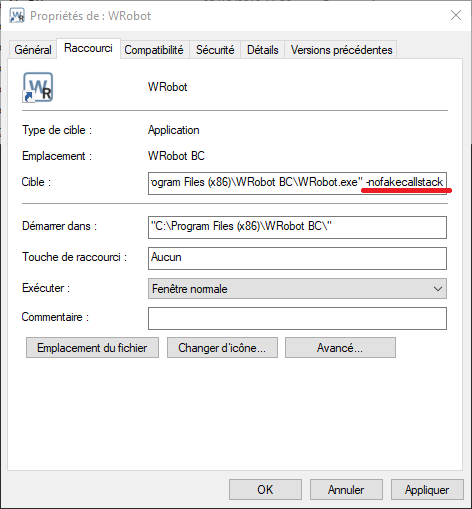
-
Hello, try to run WRobot with shortcut "WRobot (DX hook)"
-
Hello, he has option for jump and smooth path in advanced general settings
-
To close wow process use wManager.Wow.Memory.WowMemory.Memory.GetProcess().Kill();
-
Hello, did you read the log file to see if it says what the bot does?
-
use code like wManager.Wow.Class.QuestClass quest; var r = wManager.Wow.Helpers.Quest.QuesterCurrentContext.QuestsClasses.TryGetValue("TEST", out quest); if (r && quest != null) { quest.Reset(); } (replace TEST by name of you quest) But it is more easy to use "Reset" in quest order editor
-
there is a good chance that this problem is caused by a WRobot plugin (or fightclass / profile)
-
Hello, open profile with profile editor (tab product settings), you can activate "radar 3d" tab "Map" to help you
-
Hello, you can found upgrade invoice here: https://wrobot.eu/clients/orders/
-
Try to disable all wow addons, if this works you can try to enable one per one to found the bad addon(s)
-
call method Reset() of the quest class
-
Hello, Disable all Wow addons, all WRobot plugins and share your log file please ( https://wrobot.eu/forums/topic/1779-how-to-post-your-log-file-with-your-topic/ )
-
Hello, try to disable your wow addons and to use another fightcclass
-
hello, https://stackoverflow.com/questions/1215139/reboot-machine-from-a-c-wpf-app
-
Hello, try without fightclass, if problem is not resolved if you can share your log again please
-
Can you share full log file (by private message if you want), and give me sample profile (or start/end position) that I try to reproduct problem
-
Hello, no tested but like that: public static bool ManageMovement() { if (robotManager.Products.Products.ProductName == "WRotation") { string errorsCSharp; if (wManager.Wow.Helpers.RunCodeExtension.RunScript(robotManager.Helpful.RunCode.CodeType.CSharp, @"robotManager.Helpful.Var.SetVar(""ManageMovementWRotation"", WRotation.Bot.WRotationSetting.CurrentSetting.ManageMovement);", "", out errorsCSharp)) { return robotManager.Helpful.Var.Exist("ManageMovementWRotation") && robotManager.Helpful.Var.GetVar<bool>("ManageMovementWRotation"); } } return false; } (try to call this code only one time at start (and cache value) to avoid performance problem)
-
Hello, to go to first position of path, or maybe pathfinder is used by a plugin
-
Hello, in your profile try to use "Flying" positions (waypoint)
-
Hello, check if you use mount name like is appaer in game (with upper/lower cases). If problem is not here share your log
-
Hello, Except remove NPC of your profile/db (or maybe use small npc search radius) no easy solution (you need to use c#)

