




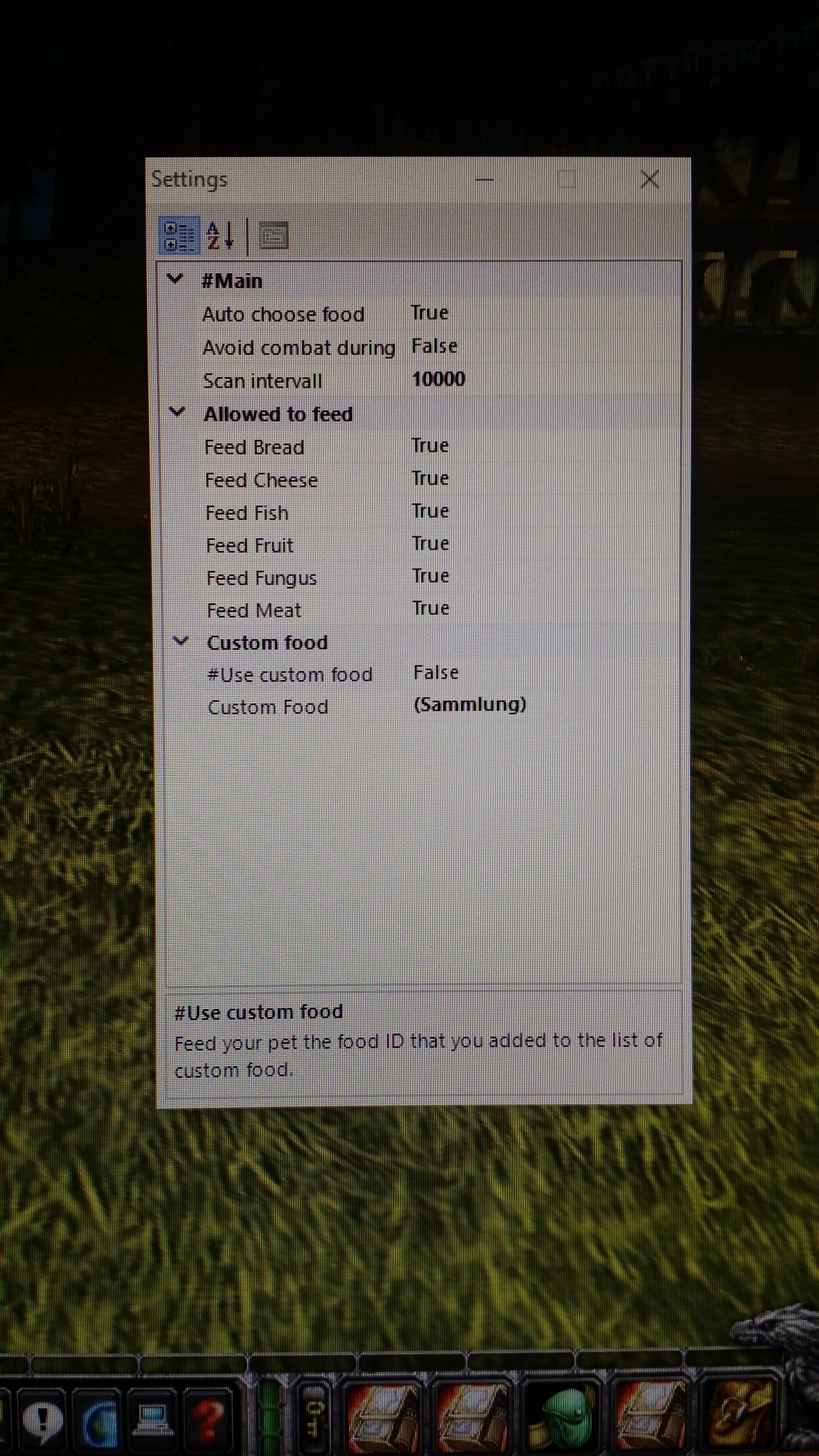
This plugin is gonna feed your Hunters pet automatically the correct food, as long as you have some in your inventory. Therefor, it is usable with any kind of auto choose food plugin and allows for a much more AFK experience, when botting Hunter. It's not just selecting a valid food depending on your pet currents level, but your pets individually diet as well. This plugin will by default only feed food that is available for purchase by vendors. But you are free to add your own food (by ID), when activated.
"Auto choose food": Main feature, automatically feeds your pet, depending on your pets diet.
"Pause bot during feed": Will break pause and start fighting, if you or your pet are in combat.
"Pause bot time": Pause time in ms.
"Scan interval": Decide how often the plugin scans for your pets happiness.
"Allowed to feed": Here you can decide which food is in general allowed to be fed to your pet. Will check your pets diet if "Auto choose food" is enabled. Will feed only and any food allowed here, when "Auto choose food" is disabled.
"Use custom food": Uses food you added yourself. Can be run with "Auto choose food". Will prefer custom food over any other food. Don't forget to make sure your pet is able to eat the food you added here!
"Custom Food": Add the ID of your custom food here.
Contains all the different available food types: Bread, Conjured Bread, Cheese, Fish, Fruit, Fungus, Meat. *Click here for full list*
Supports all food from 1-80, although I haven't tested it on BC and WotLk so far.
What's New in Version 1.2
Released
-Mostly changes regarding performance and stability
-Name is now identical for any version, so it's possible to update without closing / restarting wRobot. Version number is displayed, when the plugin is initialized
-Removed unnecessary code


You may only provide a review once you have downloaded the file.