




Droidz
Administrators
-
Joined
-
Last visited
Everything posted by Droidz
-
the date and time of your computer are correctly set?
-
Hello, to check if spell was correctly used you need to use lua event (with C # code). You use timer with spell "Pestilence", you cannot test it with buff?
-
Hello, Are you sure that your file ends with .cs (and not by .cs.txt for example)?
-
Any info can be useful, if you do not want to share in public it is always possible to send me the information by private message.
-
Hello, sorry for the delay, you can records videos when you get the problem (and share log of the sessions). If you have easy way to reproduce this problem tell me. You use last version?
-
Hello, try to install required software: and disable you firewall/vpn/proxy. if your problem is not resolved can you share your log file please ( https://wrobot.eu/forums/topic/1779-how-to-post-your-log-file-with-your-topic/ ).
-
Hello, try plugin like: using System.Threading; using robotManager.Products; using wManager; using wManager.Wow.Helpers; using wManager.Wow.ObjectManager; public class Main : wManager.Plugin.IPlugin { public void Initialize() { while (Products.IsStarted) { if (Conditions.InGameAndConnectedAndAliveAndProductStartedNotInPause) { try { if (ObjectManager.Me.IsHorde) wManagerSetting.CurrentSetting.GroundMountName = "Horde mount name"; else wManagerSetting.CurrentSetting.GroundMountName = "Ally mount name"; } catch { } } Thread.Sleep(500); } } public void Dispose() { } public void Settings() { } } replace Horde mount name and Ally mount name by you mounts names
-
Hello, Disable all Wow addon, reproduce problem and share your log file please (of bugged session) ( https://wrobot.eu/forums/topic/1779-how-to-post-your-log-file-with-your-topic/ ).
-
hi, try System.Diagnostics.Process.GetCurrentProcess().MainWindowHandle
-
Hello, add the node to your harvest list (in advanced general settings)
-
Hello, you want use skill only when target is already in combat with you? you can check if the target targeting your character.
-
No sorry I'll not add that
-
Hi, it is strange, try to restart your computer if problem is not resolved tell me
-
If the node is too deep in the water, the water detection may not work. The only solution is to blacklist the zone (or decrease the search distance)
-
ok ty, I'll release this new feature in the next update
-
Hello, in product settings (if you use gatherer product) disable option 'mount all time'. In advanced general settings you have mount distance option, increment it
-
Hello, tab "Tools" in "npc db" try to select and remove All (press key "Del"). Check if mailbox is not blacklisted (tab "Map" with radar3d). When is done, try to start bot near the mailbox when your bags are full, if problem is not resolved if you can share log of this session
-
Hello, no sorry
-
Can you try with this file and tell me if you get problem (or not): Relogger.exe
-
Hi, I'll add option like

-
Hello, can you share full log file please. You can try to use VPN (China's internet connection is not always stable with WRobot servers)
-
https://wrobot.eu/forums/topic/12499-fishing-bot-using-blink/
-
Hi, try to don't use fightclass. if problem is not resolved can you share screenshot of your fisher product settings and share your log file please
-
you have two times options, remove first line
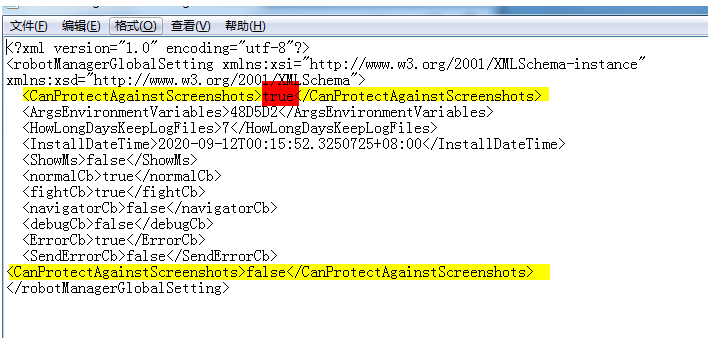
-
Hello, you have closed WRobot before to edit file?

