
Skip to content
View in the app

A better way to browse. Learn more.

WRobot

A full-screen app on your home screen with push notifications, badges and more.

To install this app on iOS and iPadOS
  1. Tap the Share icon in Safari
  2. Scroll the menu and tap Add to Home Screen.
  3. Tap Add in the top-right corner.
To install this app on Android
  1. Tap the 3-dot menu (⋮) in the top-right corner of the browser.
  2. Tap Add to Home screen or Install app.
  3. Confirm by tapping Install.

WRobot - Official

1 Screenshot

WRobotsiteLogoCONTOUR.png

More info: here

Change Log:  here

We support all Windows versions, from Win Vista to Win 11.

You can found list of supported game versions here: https://wrobot.eu/supported-wow-versions/

You can check the status of WRobot on your server here: https://wrobot.eu/byme/CompatibilityReporting/

Install notes:

Quote

Installation:

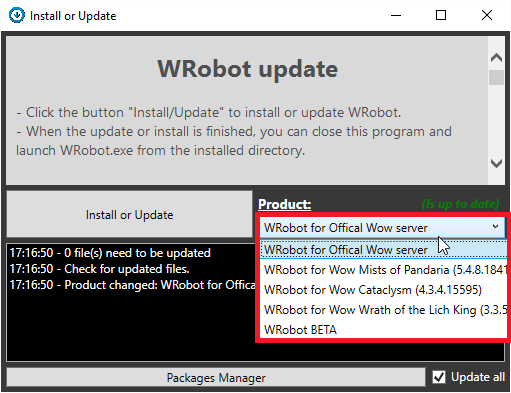
  • Download and Unzip (extract) "WRobot.zip" on your computer.
  • Launch program "Updater" (in "WRobot" folder).
  • Select version in "Product".
  • Click the button "Install/Update" to install or update WRobot.
  • When the update or install is finished, you can close this program and launch WRobot.exe from the installed directory.
Quote

Required programs on your computer for running WRobot:

WRobot don't works? go here to repair it.

Don't forget to select your WRobot version in "Update" window.

You can download old version here.

What's New in Version 09/28/21 02:12 PM

Released

No changelog available for this version.

User Feedback

Recommended Comments

sylexer

Members

How to run Wrobot TBC 2.4.3? Game is incorect

mib1337

Members

Is this just for legion or vanilla servers also?


zdl8845

Members

i can't find where download WRobot for WOW Vanilla.Please show me the URL,thanks!

BetterSister

Elite user

20 minutes ago, zdl8845 said:

i can't find where download WRobot for WOW Vanilla.Please show me the URL,thanks!

It's updater that you download from this post with it you can decide which version to use

angelooos

Members

Hi.Isnt there an option to buy for like 10 years or something?

Emanon

Members

Will the Fight Class Editor work for Wow Vanilla ?

So can I make my own profile to work on my WOW Private server?

And when Blizzard open up for theyre servers will I be able to use my newly made profiles for theyre servers also??

Razzue

Members

just bought a 3 day trial, gonna abuse the heck out of gatherer, and leave it for a week! if my account survives i'll be coming back :D, the "ban section" looks rather promising. hopefully it works as well as led to believe!

felipewarms

Members

Not working.. can some one help? I just boght the key.

lawdawe

Members

Hi wrobot works on one of my computers

but when i tried my main one, i open the Wrobot.app and press yes for admin,

it then doesnt open, no error or anyting just asks for admin access then nothing pops up after that

eeny

Elite user

41 minutes ago, lawdawe said:

Hi wrobot works on one of my computers

but when i tried my main one, i open the Wrobot.app and press yes for admin,

it then doesnt open, no error or anyting just asks for admin access then nothing pops up after that

Tried turning off UAC (User Account Control) ???

hasuho

Members

1472918526_.jpg.29318a330df567bdbac64576ca445ecf.jpg

An implied reference is not set to an instance of an object

It does not run

CHENGYAN

Members

bot for Legion currentl

Dom505

Members

does this support Elysium servers


zhangtao

Members

Hello,How to try it?

dono2jean1

Members

ho how can i get it to run on 3.3.5 private server got the key but says game incorrect


dono2jean1

Members

please someone advise me ive got my key just want to know how to run on 3.3.5 private server says game incorrect

eeny

Elite user

14 minutes ago, dono2jean1 said:

please someone advise me ive got my key just want to know how to run on 3.3.5 private server says game incorrect

prob best to make a thread for it.

1- Make sure you have purchased a private server key

2- when you install wrobot you need to specify the wow release.  in this case 3.3.5

3- if your wow release is not there- PM droidz with a screenshot of the client login page- it will often provide the client version and droidz will figure something out.

dono2jean1

Members

i have the key everything like im saying as soon as i run wow it give me that game incorrect

holyburst

Members

Don't work for older patch, always says incorrect game version, 23€ for nothing


darkrider23

Members

will there be a BFA Update?

ts0726

Members

Will it be updated?

alzaem121

Members

please update  it to BFA:(

Elixyre

Members

Me2 want an BFA Update pls ?

Razzue

Members

Droidz has stated that it will not be updated to live servers.

And the only Private BfA server hasn't even started their beta run yet.

Alphie32

Members

On 9/16/2018 at 3:38 PM, Razzue said:

Droidz has stated that it will not be updated to live servers.

And the only Private BfA server hasn't even started their beta run yet.

If youre talking about the BFA pServer that's in "alpha" or whatever bullsh*t they're calling it... It's stable enough to have this bot on there

Create an account or sign in to comment

Account

Navigation

Search

Search

Configure browser push notifications

Chrome (Android)
  1. Tap the lock icon next to the address bar.
  2. Tap Permissions → Notifications.
  3. Adjust your preference.
Chrome (Desktop)
  1. Click the padlock icon in the address bar.
  2. Select Site settings.
  3. Find Notifications and adjust your preference.