
Skip to content
View in the app

A better way to browse. Learn more.

WRobot

A full-screen app on your home screen with push notifications, badges and more.

To install this app on iOS and iPadOS
  1. Tap the Share icon in Safari
  2. Scroll the menu and tap Add to Home Screen.
  3. Tap Add in the top-right corner.
To install this app on Android
  1. Tap the 3-dot menu (⋮) in the top-right corner of the browser.
  2. Tap Add to Home screen or Install app.
  3. Confirm by tapping Install.

WRobot - Official

1 Screenshot

WRobotsiteLogoCONTOUR.png

More info: here

Change Log:  here

We support all Windows versions, from Win Vista to Win 11.

You can found list of supported game versions here: https://wrobot.eu/supported-wow-versions/

You can check the status of WRobot on your server here: https://wrobot.eu/byme/CompatibilityReporting/

Install notes:

Quote

Installation:

  • Download and Unzip (extract) "WRobot.zip" on your computer.
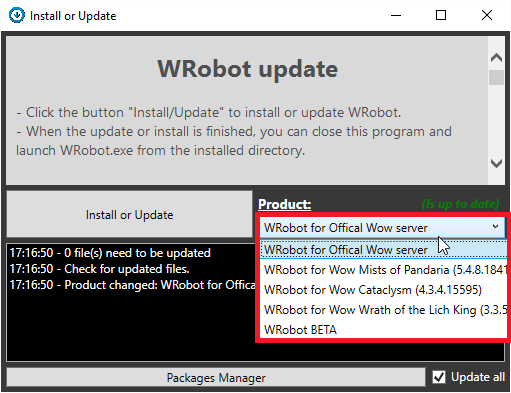
  • Launch program "Updater" (in "WRobot" folder).
  • Select version in "Product".
  • Click the button "Install/Update" to install or update WRobot.
  • When the update or install is finished, you can close this program and launch WRobot.exe from the installed directory.
Quote

Required programs on your computer for running WRobot:

WRobot don't works? go here to repair it.

Don't forget to select your WRobot version in "Update" window.

You can download old version here.

What's New in Version 09/28/21 02:12 PM

Released

No changelog available for this version.

User Feedback

Recommended Comments

Razzue

Members

22 hours ago, cugot said:

If youre talking about the BFA pServer that's in "alpha" or whatever bullsh*t they're calling it... It's stable enough to have this bot on there

Nazmir is rather stable now yes. 

Back when I originally posted the comment it wasn't even in alpha ( I was a tester.)

Mykoplazma

Members

Be aware that Tauri is detecting that bot long time and wrobot is unusable there.

officiallevij

WRobot user

Do I need to purchase a separate key to use TBC? I've using using wrobot on WOTLK for years. I have active sub. Thanks

S4rb4D

Members

Nice Bot, trying it for leveling ?

Iklan Gold.jpeg

adamvb

Members

Is there any version for 3.35?show me the link for download plz.

Neoinvoker

Members

Version 1.13 support Needed!

1.13.2.32089


Rouxor

Members

On 10/20/2019 at 4:37 PM, Neoinvoker said:

Version 1.13 support Needed!

1.13.2.32089


No news ?

Eanily

Members

I can't download WROBOT

Danterson

Members

if i buy the full version can i use it on official server?

Sir Oberon

Members

what do u do if its asking for the framework but you already have a higher version installed?

Mordordevil

Members

Download link appears to be broken....

APilotiv

Members


does not work on version 2.5.1 TBCC

adsterr

Members

Does this bot work with warmane server 3.3.5a icecrown?

brody4

Members

not working tbc


ProusesGaming

Members

cant download 

hhert

Members

Useless!!! I tried the trial for gathering and in 15 minutes it gathered one node I stood over and the rest of the time left auto-attacking random mobs. Would not advise even if it is free to use.

Cookieking

Members

On 5/18/2016 at 9:17 PM, dida1990 said:

Just for private servers 🙂

Instead he added a key for 2,99€

http://wrobot.eu/store/product/2-wrobot-subscription/

we all gotta live you fool XD we all have to do our share to support others to not starve!!!! i gonna test it and if it really works good i gonna buy the key.

Cookieking

Members

On 2/20/2022 at 9:19 PM, hhert said:

Useless!!! I tried the trial for gathering and in 15 minutes it gathered one node I stood over and the rest of the time left auto-attacking random mobs. Would not advise even if it is free to use.

you heard of development and updates you idiot? i guess not since you are too judgemental and stupid!!!!

Cookieking

Members

On 1/14/2022 at 9:08 PM, ProusesGaming said:

cant download 

why not? you have to sign up first bro!

looptata

Members

It's saying wrong game version but I know for a fact I am using the right one. I get this error with 4.3.4.15595 (Cataclysm). Any ideas?

Create an account or sign in to comment

Account

Navigation

Search

Search

Configure browser push notifications

Chrome (Android)
  1. Tap the lock icon next to the address bar.
  2. Tap Permissions → Notifications.
  3. Adjust your preference.
Chrome (Desktop)
  1. Click the padlock icon in the address bar.
  2. Select Site settings.
  3. Find Notifications and adjust your preference.