




Droidz
Administrators
-
Joined
-
Last visited
Everything posted by Droidz
-
https://wrobot.eu/forums/topic/1381-repairinstall-wrobot/?do=findComment&comment=42784
-
You get black screen (mainly when you use remote desktop software or when you try to record or take screenshot) Since WRobot 2.0 you can get a completely black WRobot window when viewing with remote software like TeamViewer, to resolve it: Close WRobot Open and edit with notepad file "WRobot\Settings \RobotManagerGlobalSetting.xml" Replace <CanProtectAgainstScreenshots>true</CanProtectAgainstScreenshots> by <CanProtectAgainstScreenshots>false</CanProtectAgainstScreenshots> (if you don't found first line, add second line before "</robotManagerGlobalSetting>") Save file and you can relaunch WRobot.
-
Hello, use https://wrobot.eu/forums/topic/8588-declaration-code/?do=findComment&comment=39434 (RunCode) Var.SetVar("counter", 0); (RunCode) Var.SetVar("counter", Var.GetVar<int>("counter") + 1); (If) Var.GetVar<int>("counter") == 10
-
Hello, Can you share your log file please ( https://wrobot.eu/forums/topic/1779-how-to-post-your-log-file-with-your-topic/ ).
-
-
-
Hello, Can you share your log file please ( https://wrobot.eu/forums/topic/1779-how-to-post-your-log-file-with-your-topic/ ).Add line "<CanProtectAgainstScreenshots>false</CanProtectAgainstScreenshots>" after </SendErrorCb>Hello, Check if your framework version is updated, you can also try to close WRobot and edit with notepad file "WRobot\Settings\RobotManagerGlobalSetting.xml" and replace "<CanProtectAgainstScreenshots>true</CanProtectAgainstScreenshots>" by "<CanProtectAgainstScreenshots>false</CanProtectAgainstScreenshots>" It is remote deskop?Hello, Can you share your log file please ( https://wrobot.eu/forums/topic/1779-how-to-post-your-log-file-with-your-topic/ ).Try to relaunch updater to check if all is good, and if you can share full log fileHello, I just released WRobot 2.0. It is mainly UI update, but I have added some features like LuaBot language (to make your WRobot plugins/scripts with lua, you can launch the dev tool to see code sample), better vb.net support... (I'll write changelog in next days). If you get problem to launch it, check if you use recent Framework version (min 4.5), Windows XP support has ended. In the next week, I'll primarily work during next weeks/months to improve artificial intelligence/movement/reaction of the bot to try to look more natural (for that I will also have to improve my personal knowledge). A lot of users abuse of the "unlimited sessions by IP", I think than I'll change rules for the new subscriptions (like 1 session for 20€ per year, 5 for 30€/y...), and probably limit number of session of the old subscriptions (like max 25 sessions, some user running currently more than 100 sessions at the same time...). As said here WRobot will be a bot only for private servers, I need to edit/reorganize sites/forums/downloads for that (I'll do it in next weeks). EDIT 25 April 2018: If you get black WRobot window read this, if WRobot closes automatically when you use the same key on multiple IP address at the same time it is normal, an old bug allowed to do it (with unlimited and private subscriptions) but it was fix in this update. EDIT 26 April 2018: I edited homepage to formalize than WRobot is a private servers bot. I also added new type of subscription, based maximum of running sessions at the same time (no IP limit, it is better if you want to use several IPs), but you cannot run at the same time more than X sessions at the same time), and I converted old "unlimited" and "for private servers" subscriptions to the new type of subscription with the maximum of 10 sessions at the same time. You can see new subcriptions and the price in the store. I repeat, update of WRobot for official servers was planned before than I decide to stop this version, I released it but this but that does not change my decision, I will definitely close WRobot for official server at the latest at the "Battle for Azeroth" pre-patch (Wow version 8.x.x) . View full article
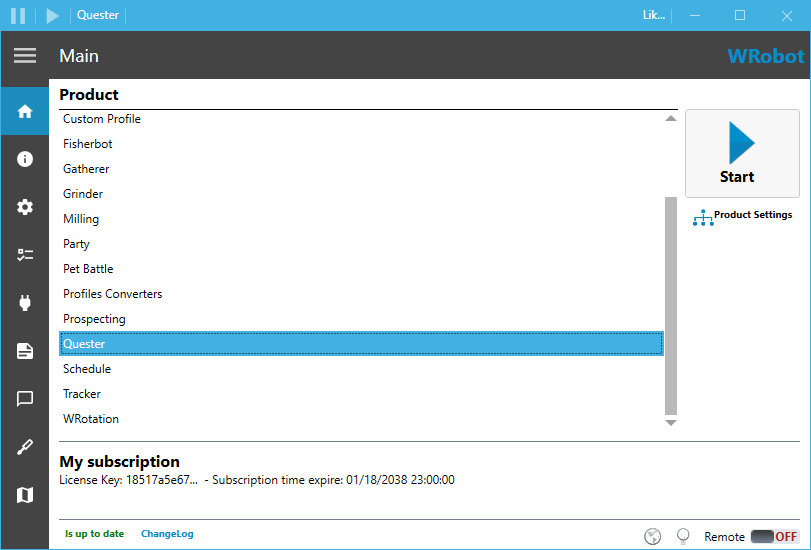 Hello, I just released WRobot 2.0. It is mainly UI update, but I have added some features like LuaBot language (to make your WRobot plugins/scripts with lua, you can launch the dev tool to see code sample), better vb.net support... (I'll write changelog in next days). If you get problem to launch it, check if you use recent Framework version (min 4.5), Windows XP support has ended. In the next week, I'll primarily work during next weeks/months to improve artificial intelligence/movement/reaction of the bot to try to look more natural (for that I will also have to improve my personal knowledge). A lot of users abuse of the "unlimited sessions by IP", I think than I'll change rules for the new subscriptions (like 1 session for 20€ per year, 5 for 30€/y...), and probably limit number of session of the old subscriptions (like max 25 sessions, some user running currently more than 100 sessions at the same time...). As said here WRobot will be a bot only for private servers, I need to edit/reorganize sites/forums/downloads for that (I'll do it in next weeks). EDIT 25 April 2018: If you get black WRobot window read this, if WRobot closes automatically when you use the same key on multiple IP address at the same time it is normal, an old bug allowed to do it (with unlimited and private subscriptions) but it was fix in this update. EDIT 26 April 2018: I edited homepage to formalize than WRobot is a private servers bot. I also added new type of subscription, based maximum of running sessions at the same time (no IP limit, it is better if you want to use several IPs), but you cannot run at the same time more than X sessions at the same time), and I converted old "unlimited" and "for private servers" subscriptions to the new type of subscription with the maximum of 10 sessions at the same time. You can see new subcriptions and the price in the store. I repeat, update of WRobot for official servers was planned before than I decide to stop this version, I released it but this but that does not change my decision, I will definitely close WRobot for official server at the latest at the "Battle for Azeroth" pre-patch (Wow version 8.x.x) .Hello, you can open and edit existing profiles with all profiles editors.13:35:29 - [Farming] Still moving! - Please verify if your key binding "Sit/Move Down" is assigned. Try to increment min/max latency, you can also try to activate option "use lua to move" and to reset your key binding (don't forget to restart WRobot) (all options are in advanced general settings)https://wrobot.eu/forums/topic/9042-how-to-use-a-proxy-correctly/Hello, try to increment your min/max latency in advanced general settings




Account
Navigation
Search
Configure browser push notifications
Chrome (Android)
- Tap the lock icon next to the address bar.
- Tap Permissions → Notifications.
- Adjust your preference.
Chrome (Desktop)
- Click the padlock icon in the address bar.
- Select Site settings.
- Find Notifications and adjust your preference.
Safari (iOS 16.4+)
- Ensure the site is installed via Add to Home Screen.
- Open Settings App → Notifications.
- Find your app name and adjust your preference.
Safari (macOS)
- Go to Safari → Preferences.
- Click the Websites tab.
- Select Notifications in the sidebar.
- Find this website and adjust your preference.
Edge (Android)
- Tap the lock icon next to the address bar.
- Tap Permissions.
- Find Notifications and adjust your preference.
Edge (Desktop)
- Click the padlock icon in the address bar.
- Click Permissions for this site.
- Find Notifications and adjust your preference.
Firefox (Android)
- Go to Settings → Site permissions.
- Tap Notifications.
- Find this site in the list and adjust your preference.
Firefox (Desktop)
- Open Firefox Settings.
- Search for Notifications.
- Find this site in the list and adjust your preference.