Droidz
Administrators
-
Joined
-
Last visited
Everything posted by Droidz
-
Changed Status to Awaiting Feedback Changed Version to All
-
Hello, This condition just return "ObjectManager.Target.Health" Can you give more informations (why you use this condition)?
-
Snippets C# codes for Fight Classes: http://wrobot.eu/forums/topic/3573-snippets-c-codes-for-fight-classes/ Snippets LUA codes for Fight Classes: http://wrobot.eu/forums/topic/1118-snippets-of-lua-codes-for-fightclass/
-
http://wrobot.eu/forums/topic/3573-snippets-c-codes-for-fight-classes/?do=findComment&comment=16508
-
Check character/target buff/debuff time left by spell id: Use condition type "C Sharp Code" with Value: wManager.Wow.ObjectManager.ObjectManager.Me.BuffTimeLeft(new List<uint> { 69369 }) >= 1000 Replace "69369" by your buff/debuff ID. Replace "Me" by "Target" to check buff/debuff on current target (you can also replace "Me" by "Pet" to check on the pet). ">= 1000" check if time left is "Bigger or Equal at 1000 millisecond", you can replace "1000" by required time left in millisacond. You can also replace ">=" by "<=" to check if "Smaller or Equal", or by "==" to check if "Equal" - http://www.tutorialspoint.com/csharp/csharp_relational_operators.htm ). To get list of player/target (de)buff id, you can go to tab "Tools" > "Development Tools" > (if you want check your target (de)buff select npc in game) > click on "Player/target buff/debuff".
-
Check if character/target buff/debuff stack count by spell id: Use condition type "C Sharp Code" with Value: wManager.Wow.ObjectManager.ObjectManager.Me.BuffStack(44544) >= 1 Replace "44544" by your buff/debuff ID. Replace "Me" by "Target" to check buff/debuff on current target (you can also replace "Me" by "Pet" to check on the pet). ">= 1" check if stack count is "Bigger or Equal at 1", you can replace "1" by required stack count. You can also replace ">=" by "<=" to check if "Smaller or Equal", or by "==" to check if "Equal" - http://www.tutorialspoint.com/csharp/csharp_relational_operators.htm ). To get list of player/target (de)buff id, you can go to tab "Tools" > "Development Tools" > (if you want check your target (de)buff select npc in game) > click on "Player/target buff/debuff".
-
Check if character/target have or not buff/debuff by spell id: Use condition type "C Sharp Code" with Value: wManager.Wow.ObjectManager.ObjectManager.Me.HaveBuff(69369) Replace "69369" by your buff/debuff ID. Replace "Me" by "Target" to check buff/debuff on current target (you can also replace "Me" by "Pet" to check on the pet). Add "!" before this code to check if not have (de)buff ( http://www.tutorialspoint.com/csharp/csharp_logical_operators.htm ). To get list of player/target (de)buff id, you can go to tab "Tools" > "Development Tools" > (if you want check your target (de)buff select npc in game) > click on "Player/target buff/debuff".
-
Snippets C# codes for Fight Classes ps: Feel free to share your tips on this post. If your message is poorly presented or contains a question, it will be deleted.
-
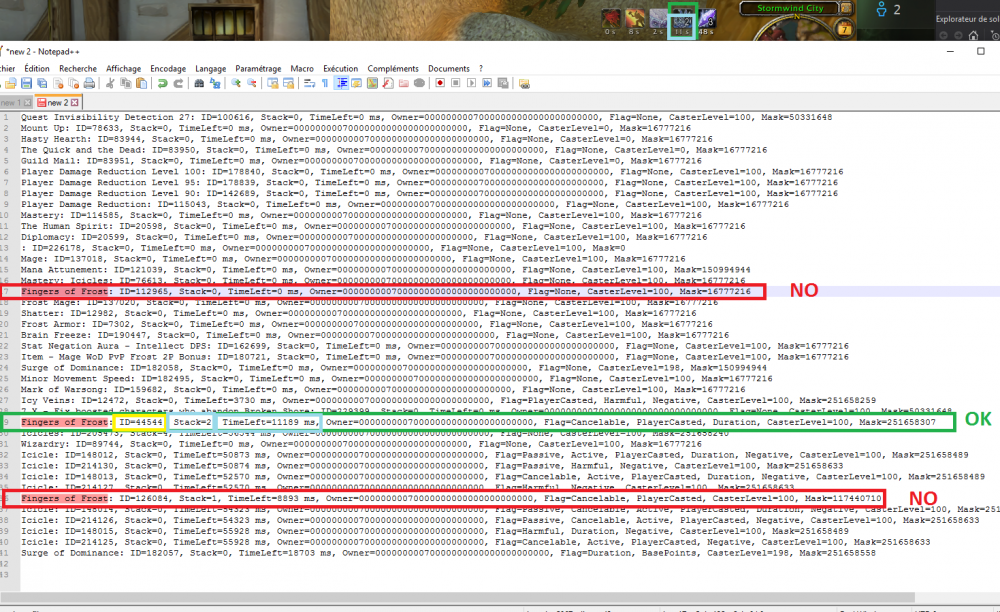
Hello, Like here: http://wrobot.eu/bugtracker/feral-casting-healing-touch-even-when-predatory-swiftness-is-not-present-r468/#comment-3141 Your character get several buffs with the same name: The best way to resolve this problem, is to use "C Sharp Code" conditon with the code: wManager.Wow.ObjectManager.ObjectManager.Me.BuffStack(44544) >= 1
-
Changed Status to Awaiting Feedback Changed Version to All
-
Hello, if you can wait next update and tell me if problem is resolved.
-
When you run WRobot (when the key works), you get "ERROR" in your logs?
-
This problem was caused by "Invision Power Services", I request support, I wait reply. Do not hesitate to post here if you get this problem.
-
http://wrobot.eu/bugtracker/license-key-not-working-r478/
-
http://wrobot.eu/forums/topic/3550-wow-client-just-updated/?do=findComment&comment=16407
-
WRobot support now wow build 22345, (re)launch WRobot and accept udpate.
-
Hello, I work in it. I'll update WRobot quickly.
-
Hello, thank you.
-
Changed Status to Fixed Changed Version to All
-
Increment option "Wait after launch" in general settings don't works?
-
This relogger version is now released.
-
Changed Status to Fixed
-
Hello, I have added new key at your account, you can found your new license here: http://wrobot.eu/clients/purchases/ . Use this license I'll resolved problem with your old key.
-
Changed Status to Confirmed Changed Version to All
-
http://wrobot.eu/forums/topic/3546-serial-not-working-anymore/