




Droidz
Administrators
-
Joined
-
Last visited
Everything posted by Droidz
-
Hello, seem to be PromoteByName : https://github.com/MOUZU/Blizzard-WoW-Interface/blob/d162a4c0d198a4381b5b6573d975635ed7316702/1.12.1/FrameXML/ChatFrame.lua#L711
-
Hello, Use lower search distance is good, you can also blacklist some zones, and avoid in your profile zones where you know that you get problem. You can also try to use option "Try to avoid group of mobs" in advanced general settings tab "Pathfinding"
-
Method check if needtorun return true (it is the method than I shared code)
-
Hello, you need to move fightclass in wrobot folder "FightClass" and select it is wrobot window tab "General settings"
-
Hello, like that (in simplified): bool RunState(State currentState) { if (currentState.NeedToRun) { foreach (var beforeState in currentState.BeforeStates) { RunState(beforeState); } currentState.Run(); foreach (var nextState in state.NextStates) { RunState(nextState); } return true; } return false; }
-
Hello, I take note of this problem I try to solve it in the next updates, I come back here when it's done.
-
Hello, you cannot change that (or put lower to value)
-
Hello, Disable addons and plugins when you share log. You get this problem with all profiles/quests or only on this quest/profile?
-
Hello, Disable all Wow addons, all WRobot plugins and share your log file please ( https://wrobot.eu/forums/topic/1779-how-to-post-your-log-file-with-your-topic/ ).
-
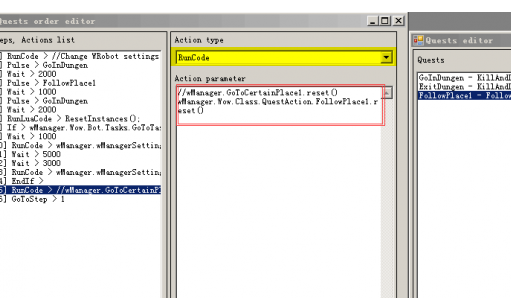
Get quest instance and call "Reset()" method
-
here: Select "Reset" instead "RunCode" (in parameter select your quest)
-
Problem is probably in your profile, plugins change nothing about that
-
hello, to reset use "Action type" "Reset"
-
using wManager.Wow.ObjectManager; public class Main : wManager.Plugin.IPlugin { public void Initialize() { robotManager.Events.FiniteStateMachineEvents.OnBeforeCheckIfNeedToRunState += (engine, state, cancelable) => { try { if (state is wManager.Wow.Bot.States.Resurrect) cancelable.Cancel = true; } catch { } }; } public void Dispose() { } public void Settings() { } }
-
Hello, use plugin like (no tested): using System.Threading; using robotManager.Products; using wManager.Plugin; using wManager.Wow.Helpers; using wManager.Wow.ObjectManager; public class Main : IPlugin { private bool _isLaunched; public void Initialize() { _isLaunched = true; while (_isLaunched && Products.IsStarted) { if (Conditions.InGameAndConnected && Conditions.ProductIsStartedNotInPause && ObjectManager.Me.IsDead) { Lua.LuaDoString("AcceptResurrect()"); Thread.Sleep(1000); } Thread.Sleep(150); } } public void Dispose() { _isLaunched = false; } public void Settings() { } }
-
Sorry, except quest type "followpath" Quester don't support aquatic mount, only grinder/gatherer bot can do swimming profile.
-
It is for a quest (or just gather)?
-
ok thanks, because i looked i'm pretty sure it's a blacklisted zone problem, but i can not find what where WRobot blacklist zone and cause this problem (WRobot blacklist zone on a distance of 1 yard when you're stuck, but you do not have much stucks in your log)
-
I think than problem is when WRobot find path from ground to water, path is ground path, you need to add several water hotspots (when if find path from water to water it is swim path) (or use quest type followpath)
-
Hello, it will be difficult to help you without your profile
-
No default feature for that sorry, if you use quest profile you can add step for that, or with plugin but you need a good knowledge of Wow and WRobot.
-
Hello, check if your profile don't change your settings
-
Hello, use step type reset (to reset your follow path quest before to run it again)
-
in advanced general settings
-
Hello, in your profile or in your "NPC DB" (tab "tools") add npc trainer and enable option train new spell


