.png.6c64c902ca16bbc404400f330250ca68.png)
Sakonung
Members
-
Joined
-
Last visited
-
Currently
Viewing Topic: Ready-Made WRobot Profiles, Fight Classes, Plugins, and More
Everything posted by Sakonung
-
Всем привет, это мой последний пост на Wrobot форуме, последние пару месяцев. я активно сотрудничал с многими из вас. Помогал и подсказывал тем, кто писал мне в личные сообщения в дискорде (.fhr), а с некоторыми (им отдельно спасибо), мне было приятно работать, да и в целом, болтать про нашу ботоводсткую тему. Они оказались очень приятными людьми. Но всякая история подходит к концу и моя история тоже. Я давно хотел сделать и дать возможность другим ботоводам, что хочет ботить, но не имеет знания, готовые продукты, на уровне состояния. Нажал одну кнопку и за тебя сделали. По-настоящему, автоматизацию. То, ради чего и задумывался боттинг. И то. от чего я сам настрадался, когда этим занимался. Я использовал Wrobot и автоматизировал в нем абсолютно все, что считал нужным и то, что мы теперь тоже можете использовать, если заплатите мне, ту небольшую сумму за по-настоящему качественный продукт, который позволит вам зарабатывать деньги. От прокачки и продажей персонажа до фарма в открытом мире, а именно: Фулл прокачку Альянс 1-80 х1 570+ квестов. Старые квесты удалены, маршрут максимально оптимизирован. (Протестирована на Sirus x3/ Circle x1), по результатам, 7 дней 20 часов, на x1. Любой реалм выше, просто делите это время. Например, Sirus x3 заняло 2 дня 20 часов. (Демо версию вы можете увидеть: https://wrobot.eu/files/file/2084-quester-1-20-lvl-human-alliance-full-automation/) Цена: 18 тысяч рублей Фулл прокачка Орда 1-80 х1, 680+ квестов (Протестирована на Sirus x3/Circle x1), по результатом, выигрыш 7 дней 9 часов. Sirus x3 показал 2 дня 11 часов. (Демо версияю, можете увидеть здесь: https://wrobot.eu/files/file/2097-quester-1-20-lvl-orc-horde-full-automation/) Цена: 18 тысяч рублей AutoTraining - Автопрокачка всех собирательских профессий 1-450 лвл, а именно Снятие шкур/Травничество/Горное дело/Рыбалка. Поддерживает обе фракции. Полностью автоматизирован. (Демо, как это выглядит, НЕ РАБОЧИЙ ПРОДУКТ, ЛИШЬ СКРИНШОТЫ И ОПИСАНИЕ: https://wrobot.eu/files/file/2098-autotraining-demo-not-working-version/) Цена: 12 тысяч рублей CharacterCreator - Автосоздание персонажей. Больше вам не нужно, самому создавать персонажей, после банов. Теперь, вы просто указываете клиент. загружаете список в формате .txt и приложение за вас создает нужных вам персонажей, куда вы уже можете подключить Wrobot и начать ботить. (Видео демонстрация на ютубе: https://www.youtube.com/watch?v=UupWgd0eQP0) Цена: 8 тысяч рублей Автопродаже вещей на аукционе Sirus, под Circle вы можете использовать штатный Wrobot auction и закрывает подсказки обучения и промо-рекламы (Sirus) Цена: 4 тысяч рублей Полностью все готовые fightclass с технологией антидетекта (уже почти все пиратки умеют детектить, то, как вы нажимаете кнопки, но с этот файткласс это обходит) Поддерживает все ротации 1-80, все классы, кроме хантов и ДК. Цена: 12 тысяч рублей Автопокупка сумок, еды, маунтов, обучение профессий. Стабильно и автоматически. Значительно улучшенная и переработанная версия Wholesome Vendors. По сути, за основу там взята лишь БД, а все остальное, было переписано с нуля, чтобы добиться 0 взаимодействия с ботом. Цена: 4 тысяч рублей SirusHelper - незаменимый плагин, благодаря которому, ваш бот сам будет использовать банки на сирусе, открывать их сумки, следить за вашим квестлогом (а если вы используете мой квестер, то поверьте, ваш бот будет выполнять МНОГО квестов, он вам понадобится), чтобы у вас всегда было число и бот делал только актуальные задания. И также, будет держать вас всегда в невидимке от других ботхантеров. Цена: 6 тысяч рублей Butler 1.1 (Название сохранено в пользу плагина с которого я начинал, но общего у них лишь название), потому что мой Butler позволяет вам: Автоматически надевать вещи под каждый класс. Подбирать оружие с учетом классовых ограничений (например, ретро пал, вряд ли будет бегать с щитом) Автоматически надевать сумки Выбирать квестовые предметы с учетом полезности на вашего персонажа Всплывать вверх по воде, чтобы ваш персонаж не утонул в море. Удаляет хлам из сумок, всякий, который нельзя продать вендору и бот никак не может использовать. Чтобы ваши сумки всегда были чистые И все это поддерживает RU(Sirus) или EN (Warmane|Circle) без каких-либо проблем. Цена: 8 тысяч рублей Система GoToAuction, благодаря который, ваш бот, сам отправится в столицу вашей фракции и продаст все, что вы нафармили на аукционе. Вам не придется никогда его самому вести (сочетается с автопродажей на аукционе Sirus, 5 пункт). и вернется назад. Цена: 10 тысяч рублей DungeonFarm - готовый редактор, профилей, системы. Чтобы ваши персонажи, могли в одиночку фармить вам данжи и доставать оттуда голду, ни с кем не конкурируя за ресурсы. В цикле 24 на 7 или как вы пожелаете. (Демонстрация на ютубе: https://youtu.be/o00eCACNcJg) Цена: 10 тысяч рублей MoveLikeHuman (MLH), сделанная с нуля система движения персонажа, сглаживания. Чтобы ваш бот, двигался ОЧЕНЬ ПЛАВНО, с смог добиться, без деградации в качестве и точности Wrobot навигации. Walk/Ground60/Ground100 - 92.2% СГЛАЖИВАНИЯ, и полетка на 150% и 280 - 97% сглаживания, при этом, плагин не вмешивается в работу навигации Wrobot, он с ней сотрудничает и плавно работает на всех этапах. (Демонстрация на ютубе: https://youtu.be/PJWD2oFBqrM) Цена: 8 тысяч рублей И много еще всего... К сожалению, я не могу опубликовать полный список вещей, который должны быть, если вы будете очень внимательные, то поймете, чего тут не хватает, так как это были спецзаказы. И, как я всегда говорю своим клиентам, если они что-то хотят реализовать, придумать, я это сделаю для них, и никому рассказывать не буду. При условии, что другой клиент, сам не додумается до этого, тогда я имею право перепродать ему софт, вместо того. чтобы создавать с нуля. Может когда-нибудь, я выложу и это в продажу или бесплатно, но это уже будет явно другая история, так как с Wrobot, я все, что хотел сделал. В остальном, буду рад увидеть вас в своем discord, если вас что-то заинтересовало, Discord: .fhr P.S. Шаг 10 и 5, могут показаться похожи, но нет. Шаг 5 только автоматически продает вещи на аукцион. А шаг 10 отводит персонажа на аукцион, дает ему время продаться, собрать голду с почты, вернуться в аукционеру, допродаться, после чего возвращает его назад на фарм. Отдельно хочу поблагодарить часть людей, что активно оплачивали разработку, что позволили мне, все это сделать, выступили бета-тестерами, и с помощью их фидбэка, удалось добиться состояние ПОЛНОЙ АВТОМАТИЗАЦИИ, буквально 1 кнопка. И как еще оказалось, многие из них - это очень хорошие люди, я благодарен им за это. Желаю им успехов в их делах и надеюсь, что когда-то у нас еще будет возможность поработать вместе. Также, приложу скриншот одного из них, что приятно прокомментировал разработку и разрешил этим поделиться. Спасибо ему!) Я все также, буду рад помочь вам с разработке и выполнить лично ваш заказ. если вам что-то понадобится связанное с пиратками по WoW. EN Version: Hello everyone, this is my last post on the WRobot forum. Over the past few months, I have been actively working with many of you. I helped and gave advice to those who messaged me privately on Discord (.fhr), and with some of you (special thanks to those people), it was a pleasure not only to work together but also to simply chat about our botting-related topics. They turned out to be really nice people. But every story comes to an end, and so does mine. For a long time, I wanted to create and provide other botters, who want to bot but don't have the necessary knowledge, with ready-to-use products at a level where you simply press one button and everything is done for you. Real automation. The very reason botting was created in the first place. And something I personally struggled with a lot when I was doing it myself. I used WRobot and automated absolutely everything I considered necessary. And now you can use all of it too, if you pay me a small amount for a truly high-quality product that will allow you to make money. From leveling and selling characters to farming in the open world, specifically: Full Alliance leveling 1–80 x1, 570+ quests. Old quests have been removed, and the route has been optimized as much as possible. (Tested on Sirus x3 / Circle x1). According to the results, it took 7 days and 20 hours on x1. For any realm with a higher rate, simply divide this time. For example, Sirus x3 took 2 days and 20 hours. (You can see the demo version here: https://wrobot.eu/files/file/2084-quester-1-20-lvl-human-alliance-full-automation/) Price: 18,000 RUB Full Horde leveling 1–80 x1, 680+ quests. (Tested on Sirus x3 / Circle x1). According to the results, the completion time was 7 days and 9 hours. Sirus x3 showed 2 days and 11 hours. (You can see the demo version here: https://wrobot.eu/files/file/2097-quester-1-20-lvl-orc-horde-full-automation/) Price: 18,000 RUB AutoTraining – Automatic leveling of all gathering professions from 1 to 450, specifically Skinning / Herbalism / Mining / Fishing. Supports both factions. Fully automated. (Demo showing what it looks like, NOT A WORKING PRODUCT, ONLY SCREENSHOTS AND DESCRIPTION: https://wrobot.eu/files/file/2098-autotraining-demo-not-working-version/) Price: 12,000 RUB CharacterCreator – Automatic character creation. You no longer need to create characters yourself after bans. Now you simply specify the client, load a list in .txt format, and the application creates the characters you need. After that, you can connect WRobot and start botting. (Video demonstration on YouTube: https://www.youtube.com/watch?v=UupWgd0eQP0) Price: 8,000 RUB Automatic selling of items at the Sirus Auction House. For Circle, you can use the built-in WRobot Auction. It also closes tutorial pop-ups and promotional advertisements (Sirus). Price: 4,000 RUB Completely ready-to-use fightclasses with anti-detection technology. (Almost all private servers can now detect how you press buttons, but these fightclasses bypass that detection.) Supports all rotations from 1 to 80, all classes except Hunters and Death Knights. Price: 12,000 RUB Automatic purchasing of bags, food, mounts, and profession training. Stable and fully automatic. A significantly improved and reworked version of Wholesome Vendors. Essentially, only the database was used as a foundation, while everything else was rewritten from scratch to achieve zero interaction with the bot. Price: 4,000 RUB SirusHelper – An essential plugin that allows your bot to automatically use potions on Sirus, open their bags, monitor your quest log (and if you use my Quester, believe me, your bot will complete A LOT of quests, so you will need it), making sure there is always enough space in your quest log and that the bot only completes relevant quests. It will also keep you invisible to other bot hunters at all times. Price: 6,000 RUB Butler 1.1 (The name was kept in honor of the plugin I started with, but the name is the only thing they have in common), because my Butler allows you to: Automatically equip gear for every class. Select weapons based on class restrictions (for example, a Retribution Paladin is unlikely to run around with a shield). Automatically equip bags. Select quest rewards based on their usefulness to your character. Swim up to the water's surface so your character doesn't drown in the sea. Remove junk from bags, including anything that cannot be sold to vendors and that the bot cannot use in any way, so your bags always stay clean. And all of this supports RU (Sirus) or EN (Warmane | Circle) without any problems. Price: 8,000 RUB GoToAuction system, thanks to which your bot will automatically travel to your faction's capital and sell everything you have farmed at the Auction House. You will never have to take it there yourself (works together with automatic Auction House selling on Sirus, point 5). Afterward, it will return. Price: 10,000 RUB DungeonFarm – A ready-to-use profile and system editor that allows your characters to farm dungeons solo and collect gold without competing with anyone for resources. Running in a 24/7 loop or however you prefer. (Demonstration on YouTube: https://youtu.be/o00eCACNcJg) Price: 10,000 RUB MoveLikeHuman (MLH) – A character movement and smoothing system built entirely from scratch, allowing your bot to move VERY SMOOTHLY. I managed to achieve this without degrading the quality or accuracy of WRobot navigation. Walk/Ground60/Ground100 – 92.2% SMOOTHING, and flying at 150% and 280% – 97% smoothing. At the same time, the plugin does not interfere with WRobot navigation. It works together with it and operates smoothly at every stage. (Demonstration on YouTube: https://youtu.be/PJWD2oFBqrM) Price: 8,000 RUB And much more... Unfortunately, I cannot publish the complete list of things that should be here. If you pay close attention, you will understand what is missing, because those were custom orders. And as I always tell my clients, if they want to implement or come up with something, I will make it for them and won't tell anyone about it. Provided that another client doesn't come up with the same idea independently. In that case, I have the right to resell the software to them instead of creating it from scratch. Maybe someday I will release those things for sale or even for free, but that will clearly be another story, because I have already done everything I wanted to do with WRobot. Other than that, I'll be happy to see you on my Discord if anything interests you. Discord: .fhr P.S. Points 10 and 5 may seem similar, but they are not. Point 5 only automatically sells items at the Auction House. Point 10 takes your character to the Auction House, gives it time to sell the items, collect gold from the mailbox, return to the auctioneer, finish selling the remaining items, and then brings the character back to farming. I also want to give special thanks to some of the people who actively paid for development, allowing me to make all of this possible. They also acted as beta testers, and thanks to their feedback, I managed to achieve a state of FULL AUTOMATION, literally with just one button. And as it turned out, many of them are also genuinely good people, and I am grateful to them for that. I wish them success in everything they do and hope that someday we will have the opportunity to work together again. I'll also attach a screenshot of feedback from one of the users who kindly shared some positive comments about my work and gave me permission to share them. Many thanks to him!

-
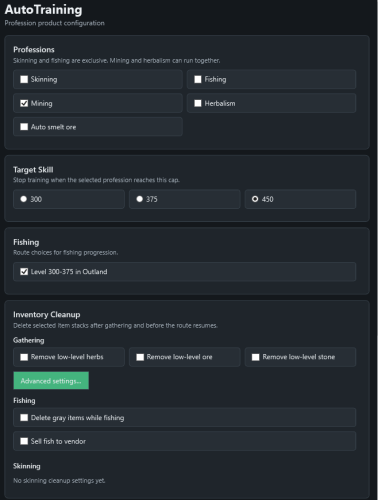 RU: Демонстрация скриншотом и описанием продукта для автоматической прокачки профессий из этого треда: https://wrobot.eu/forums/topic/16282-ready-made-wrobot-profiles-fight-classes-plugins-and-more/#comment-71115 Продукт умеет автоматически прокачивать профессии, фильтровать добываемые ресурсы и регулярно обучаться у учителя профессии. EN Verison: Screenshot demonstration and product description of the automated profession leveling tool from this thread: https://wrobot.eu/forums/topic/16282-ready-made-wrobot-profiles-fight-classes-plugins-and-more/#comment-71115 The product can automatically level up professions, filter gathered resources, and regularly visit profession trainers to learn new skills.
 -
 Демо-версия готового квестера по Орде, из этой темы: https://wrobot.eu/forums/topic/16282-ready-made-wrobot-profiles-fight-classes-plugins-and-more/#comment-71070 Demo version of the completed Horde quester from this thread: https://wrobot.eu/forums/topic/16282-ready-made-wrobot-profiles-fight-classes-plugins-and-more/#comment-71070
 -
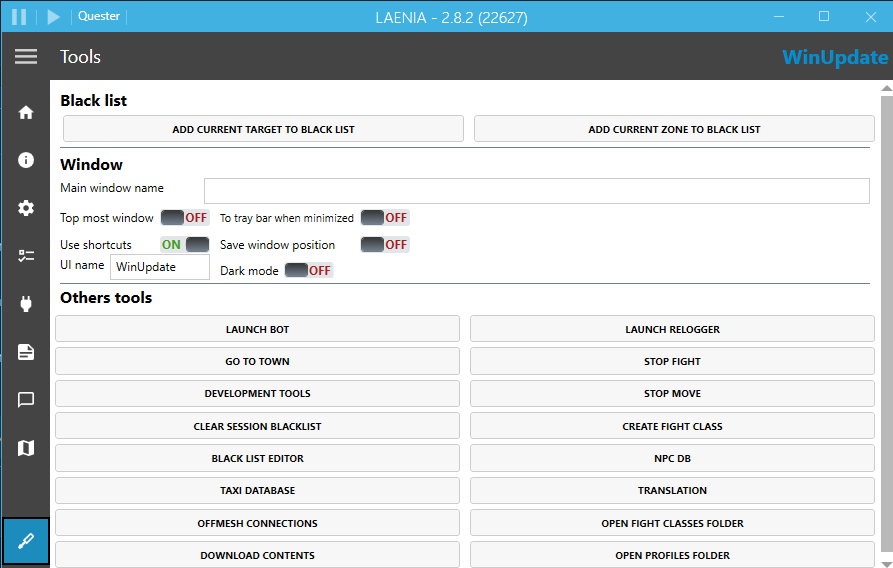
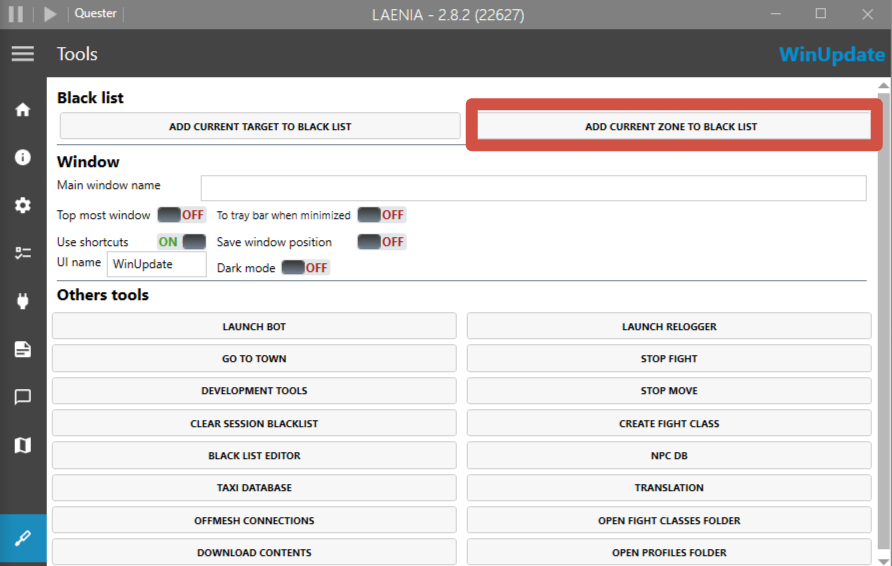
Alright, then there are only two possibilities left: The character is lagging. But if you say everything is fine and there’s no delay, then that’s probably not the issue. The node the character is trying to gather is located in a bad spot. Because of that, WRobot’s pathfinder can’t build a proper path to it. I recommend trying use another route or finding the area with the problematic node and adding it to the blacklist. That should solve the issue.
-
-
-
-
-
-
-
-
Вообще, сделать это сложно, в ручную. Ты можешь попробовать попросить нейросеть, условно Claude Code с этим помочь, но если у тебя нету подписки и ты никогда этим не занимался, то будет сложно и затратно все сделать сразу(Чтобы Claude работал, нужно минимум подписка от 100$). Поэтому, лучше, что ты можешь сделать. Найти неработающие части в профилях и заменить/удалить/восстановить их. Так будет лучше всего и быстрее. Раз ты сказал, что там всего 1-2 неработающих квестов.
-
-
Все зависит от место. Входы/выходы offmesh помогает в них, остальное по ситуации.
-
Ну, как вариант, тебе стоит попробовать добавить offmesh входы-выходы, где это регулярно происходит. Но это не решит все проблемы, рано или поздно, ты упрешься в то, что он будет в какие-то мелкие объекты врезаться (типа фонарей или указателей), тогда тут только смириться
-
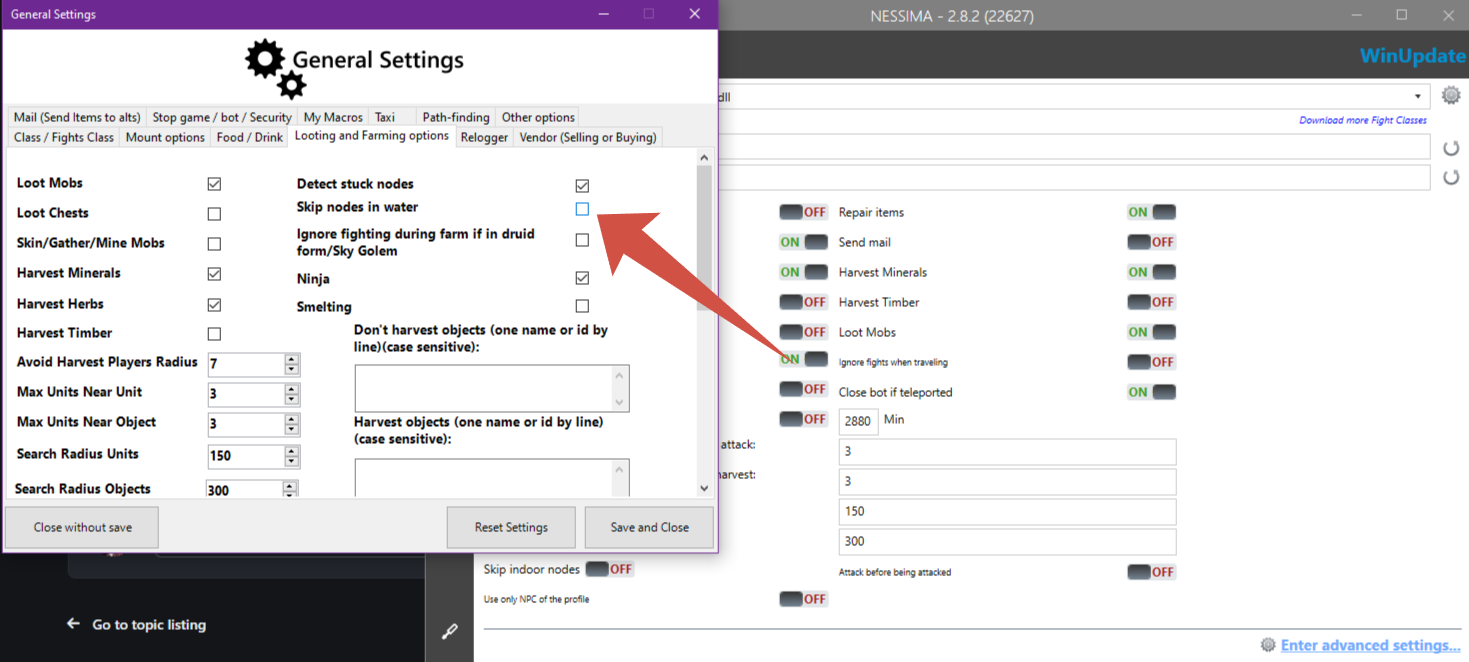
Hello. If you're using Product - Gather. Try set this setting:
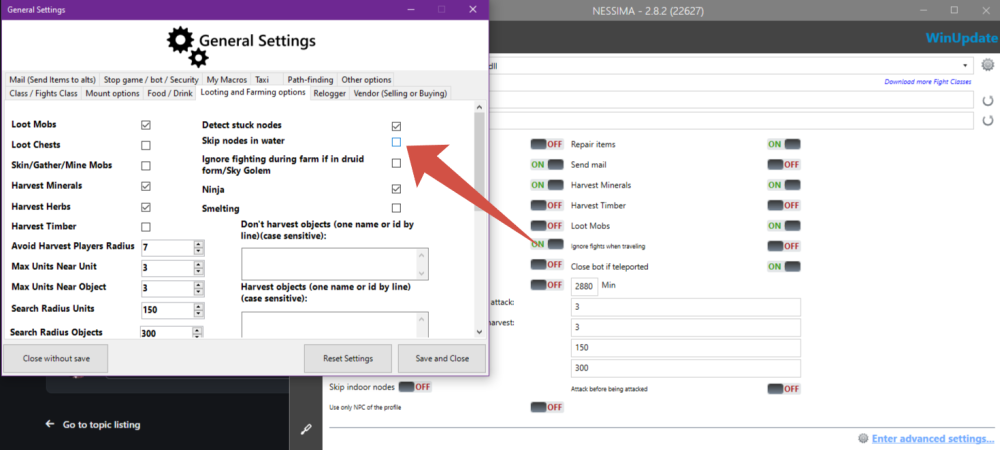
-
Then, Just waiting, when @Droidz answer here
-
I'm not sure, that problem is there... I think, it looks like, Ebonhold's client is in conflict with Wrobot, not detect. Try another version of Wrobot. A

-
Guys, anyway, you can easy to fix this. 1. Launch WoW in Window mode 2. Reset the key binding to default After that, connect your Wrobot
-
-
Error. It's seems like a bug, Idk. When I got this, I'm just pressing "Ok" and everything is okay
-
Just ignore this...
-
-
-
.thumb.png.8577cded3d499cefaf4f0b8be4185232.png)