
Marsbar
Elite user
-
Joined
-
Last visited
Everything posted by Marsbar
-
 Make sure to turn the plugin on in the plugin section. Then to test it is working, target an NPC and press CTRL + T. This adds the NPC to the tracking list. Quest NPC's should be tracked automatically.
- 5 comments
- 2 reviews
-
I often use wrobot as a companion app while I play the game manually. This tracker was built to assist with questing and resource farming. Features: Track both mining and herbalism nodes Send desktop notifications if a new node has been found if you're tabbed out of the game Track quest objectives (both mobs and game objects) Track other players and see if they're targeting you Hotkeys to add/remove Mobs or Game objects to the tracker Screenshots: Gameobjects Mobs Gathering nodes Desktop notification Keybinds: (Keys.T, KeyModifiers.Control)); // Add Target (Keys.T, KeyModifiers.Alt)); // Remove Target (Keys.L, KeyModifiers.Control)); // Show Custom Target List (Keys.L, KeyModifiers.Alt)); // Clear Custom Target List (Keys.G, KeyModifiers.Control)); // Add nearest Gameobject (Keys.G, KeyModifiers.Alt)); // Remove nearest Gameobject (Keys.K, KeyModifiers.Control)); // Show Custom Gameobject List (Keys.K, KeyModifiers.Alt)); // Clear Custom Gameobject List Unsure if I'll onward develop it but let me know your feedback if there's something useful you think should be added. Eg. "Add all treasure chests by default!!!!"
- 5 comments
- 2 reviews
-
-

-

- 5
-
-
wManager.wManagerSetting.CurrentSetting.PluginsSettings.Single(x=>x.FileName == "mQuestObjMarker.dll").Actif = true; wManager.wManagerSetting.CurrentSetting.Save(); wManager.Plugin.PluginsManager.LoadAllPlugins(); Add this to your RunCode step and change the plugin name to what your plugin name is (replace "mQuestObjMarker.dll").
-
https://github.com/Marsbars/OSPlugins/tree/master/mQuestObjMarker
-
What you see is pretty much what you get I'm afraid. It really depends on the expac you're looking to bot on. Also make sure you're in the right area depending on what you're looking for. This area for example is for quester profile for WotLK https://wrobot.eu/files/category/126-quester-wotlk/
-
Make sure you have the right ID, there are 2 humble tasks, 753 and 752. 752 is the first one. ahumbletask.xml
-
You can hook onto the https://wrobot.eu/byme/doc/html/E-robotManager.Products.Products.OnChangedIsStarted.htm event and run whatever you need to in there
-
Oh lol dude, add a using System.Linq; to the usings at the top of the file
-
This should be enough as your if statement: if (Swipe.KnownSpell && Swipe.IsSpellUsable && Swipe.IsDistanceGood && ObjectManager.Me.ComboPoint <= 3 && ObjectManager.GetWoWUnitAttackables().Count(u => u.Position.DistanceTo(ObjectManager.Target.Position) <= 8 && u.Guid != ObjectManager.Pet.Guid) >= 3)
-
Welche expansion spielst du? Es sollte schon ein paar fightclasses geben die heilen eingebaut haben. Leider ist es etwas schwer eine heal fightclass zu erstellen ohne etwas c# wissen.
-
@DroidzThis server has a modified client but is still wotlk 3.3.5a 12340, the offsets should all be the same. As Trustjah said, it used to work. What does wrobot do to check whether the wow client is supported?
-
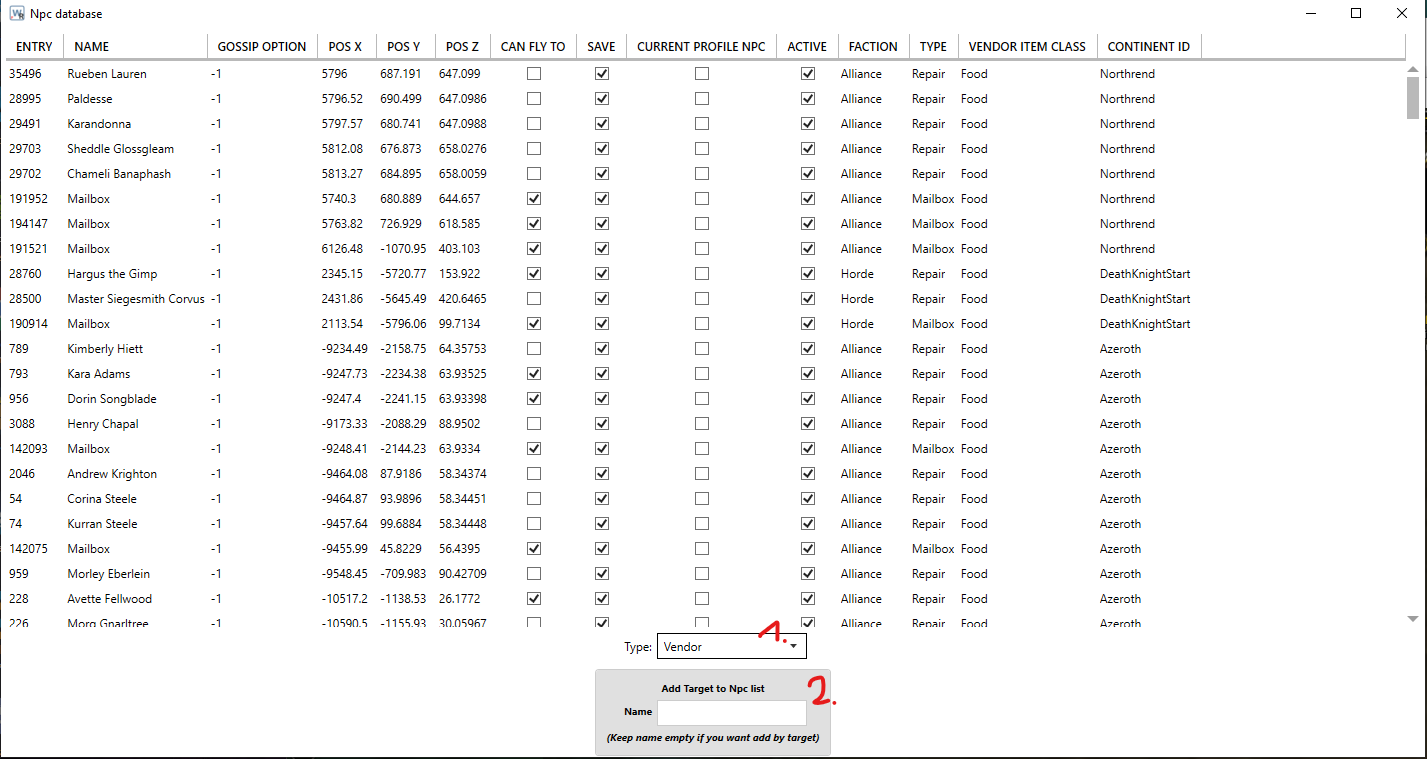
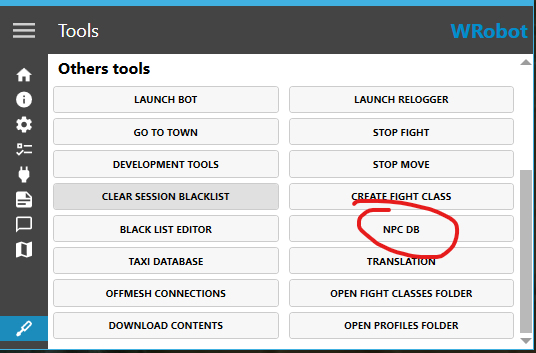
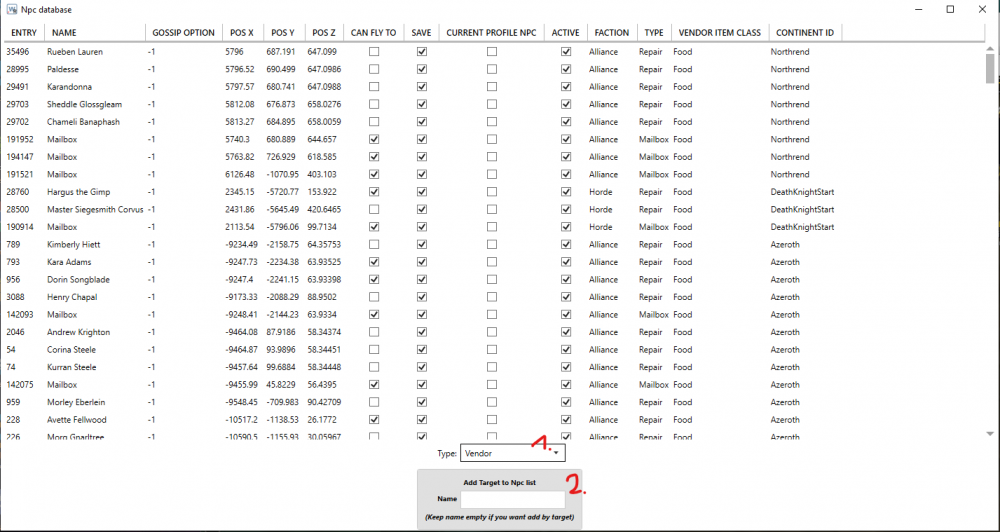
All of those things should work via the trial however for training spells, selling and repairing you need to have NPC's in your NPC DB. Wrobot attempts to add them itself but it's a bit hit and miss. Generally the profiles have NPC's in them too. To manually add NPC's and mail boxes go here: Then target the NPC in game then select the NPC type from the dropdown (1.) and click the big button (2.). This will add your current target into the NPC database and the bot should now use that NPC for whichever type you have selected.
-
-
Getting the itemLink of an item via C# is incorrect if it is an item with potentially random stats, example below: I assume this isn't correct behaviour?
-
Exactly what I was looking for, thank you.
-
Does anyone know how the RunCode class works? I want to be able to let a user enter some C# similar to the quester runcode step. The RunCode class has some Compile methods but none for running that I could decifer. Any help would be appreciated ❤️
-
 Try running the fightclass with WRotation, if it doesn't disconnect you then the fightclass isn't the problem
- 281 comments
- 28 reviews
-
-
That's not the problem really, I've played on that server myself quite a bit (including creating fightclasses that cater for classless chars) that's why I thought it'd be fine but then I went on to check and the Lua for returning pet happiness doesn't return a value, everything else should work fine.
-
No it isn't. Edit: Nevermind I was wrong - it is the fault of the server.
-
If I do Logging.Write(MovementManager.CurrentPath.Find(x => x == MovementManager.CurrentMoveTo).ToStringNewVector()); I get the Swimming type but MovementManager.CurrentMoveTo doesn't have it.
-
Ah gotcha, good to know
-
Nah some ruski server that some of my testers are on called wowcircle A lot of broken things on it so wouldn't be surprised if it was the server
-
Great contribution. Clearly a lot of work went into this.
-
It's strange, I'm getting this intermittently. I think I have found a different way of doing what I wanted to not involving clearing the target though.