News
124 articles in this category
-
Wishing you a happy new year with the hope that you will have many blessings in the year to come.
-
-
-
To celebrate new year, you can get 35% Off with discount code YEAR2018 (this coupon can then be entered on the checkout screen) (expires 01/01/2018, 6:00 PM UTC+1).
-
-
-
-
-
Hello, Small news about the future of WRobot. It is planned to support Wow private server (version 2.4.3, 3.3.5a, 4.3.4, 5.4.8) (I’ll put low price of subscription, and give free access at the users of WRobot for official server), for the moment I have finished version for 5.4.8, I'll start to work on wow 4.3.4. I’ll remove "unlimited
-
Hello members, We need your help to create fight classes. I will give 1 free month of subscription at all members that create a fight class for a wow class not already supported (you can view currently supported classes here: http://wrobot.eu/files/category/9-fight-class/ ) We need of course that your fight class works correctly. Thanks Ps: How to create fight classes: In window mode (easy): For developer: (Send me private message with an link to your figth class for get
- Teaser Paragraph:
-
Hi, Small news, now MMORobot's Forum is compatible with Tapatalk Forum App Keep up with the latest WRobot news from your cell, easier than ever :). While tapatalk is premium software and is for sale for $2.99 in the android market, I must point out that we are not affiliated with the maker in anyway, and your contribution to them does not bennifit us. Your purchase of tapatalk does not include a WRobot subscription, and your subscription to WRobot, does not include a tapatalk license.
- Teaser Paragraph:
-
Hello, Following the "The begining of the end of WRobot for official servers" , I'll stop to sell subscriptions of WRobot for official servers the 24 June 2018, and I'll remove and stop support of this version the 24 July 2018 (or before if blizz release the BfA pre-patch earlier). This don't affected versions of WRobot for private servers. Kind regards EDIT: Subscriptions removed from the store ?
-
Hello, Do not hesitate at follow MMORobot on social networks to keep you informed of news. RSS: http://wrobot.eu/rss/ccs/1c13-news/ Facebook: http://www.facebook.com/MmoRobot Tweeter: http://twitter.com/MMORobot_WRobot Youtube: http://www.youtube.com/channel/UCg9yheSvu43EWQ5qqNL6bpw/videos?sort=dd&live_view=500&flow=list&view=0 MMORobot forum supporting phone app Tapatalk: Android: https://play.google....alkpro.activity IOS: https://itunes.apple...d30788
- Teaser Paragraph:
-
Hello, Take 30% off your purchase with the coupon during the Black Friday: BlackFriday2016 Expires on 11/26/2016 at 23:59 (UTC+1)
-
Hello, Use discount code to get reduce of 35% on your subscription: blackfriday18 (this coupon can then be entered on the checkout page, expires 11/25/2018).
-
Hello, You can now paid your WRobot subscription with bitcoin. You need to send me private message to get price and my bitcoin address (not automatic way). Good day everyone.
- Teaser Paragraph:
-
Hello, Banwave hit again WRobot (on retail). I search the new detection verctor used by bliz, WRobot is currently detected, run it only if you know what you are doing! I'll release new version and post a new news when I get more info. You can discuss about this here: https://wrobot.eu/forums/topic/8666-ban-wave/
-
Hello, I'am sorry but banwave hit again WRobot for official servers. WRobot is currently detected, run it only if you know what you are doing! Check news during next days to get more informations about future of WRobot. You can discuss about this here: https://wrobot.eu/forums/topic/8666-ban-wave/ EDIT 5 April 2018: I did some changes with update for Wow 7.3.5.26365, wait and see... EDIT 6 April 2018: Last update seem detected, I just release new update. If this update d
-
Hello, Banwave hit again WRobot few hours ago (on retail). I have found how WRobot have been detected, this detection vector is activated only rarely which explains why some users are banned and others are not.. Current WRobot is detected, run it only if you know what you are doing! I'll release new version in few hours/days, I'll post a new news when new version is released You can discuss about this here: https://wrobot.eu/forums/topic/8666-ban-wave-19-february-2018-discuss
-
Hello, Ban wave hit WRobot few hours ago (on retail). I released new WRobot version to try to resolve problem (and I'll continue next hours/days to release new updates to improve protection), but to be sure that new release is safe we need to wait some weeks. For this reason, use WRobot only if you are not afraid of lost your accounts and if you know what you are doing! You can discuss about this here: https://wrobot.eu/forums/topic/8666-ban-wave-19-february-2018-discussion/
-
Hello, Mmorobot's huge discount subscription promotion is going on now, but only for a limited time! Get 20% off all new subscriptions with the coupon code 2015DISCOUNT (ends May 10th, 2015). To get 20% off your subscription: Got to our store. Select the subscription you want and click the "Add to cart" button. Click the "Checkout" button. Click on "I have a coupon to use", enter 2015DISCOUNT and then click the "Apply" button. Click the "Confirm My Order" button. Don't miss out, you
- Teaser Paragraph:
-
Happy New Year to all ! I'm excited to start another year and look forward to continuing to serve you with WRobot. This year marks a special milestone for us as we celebrate the 10-year anniversary of WRobot. I'm grateful for your support and look forward to many more years of success together. Thank you for choosing WRobot, and I hope you have a happy, healthy, and prosperous new year!
-
Hello, New WRobot update (for private servers) add security features to bypass new detection vectors used on some private servers. Don't forget to keep WRobot updated. For the plugins/profiles/fightclasses creators: I change some methods in "MemoryRobot.dll" and removed "fasmdll_managed.dll".
-
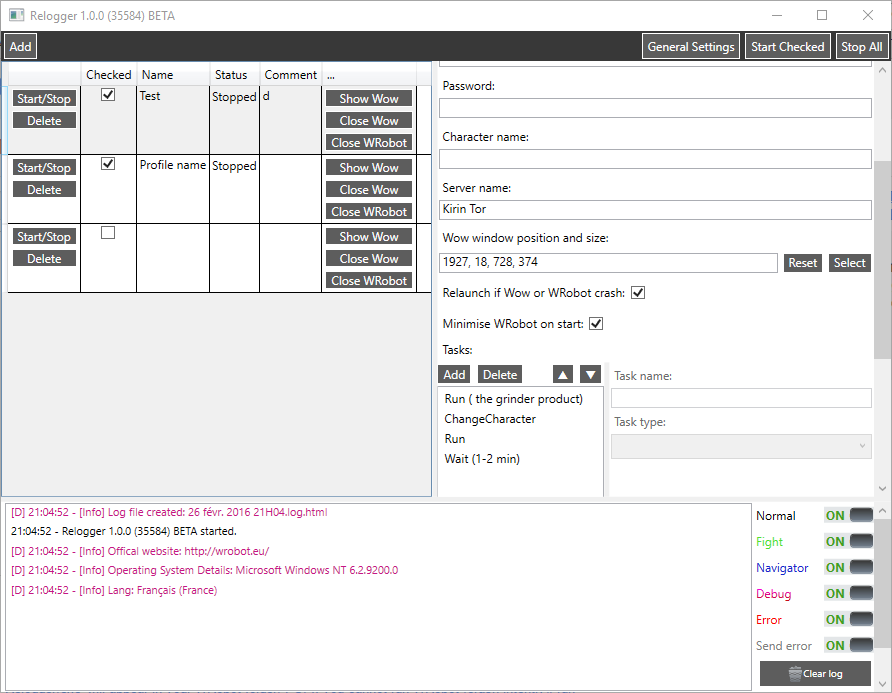
Hello, 'Relogger' application is now available. Update WRobot, the file 'Relogger.exe' will appear in your WRobot folder. PS: If you cannot run WRobot today (crash instantly), launch file "Update.exe" (you can found this in WRobot folder) and update WRobot to resolve problem.