Droidz
Administrators
-
Joined
-
Last visited
Everything posted by Droidz
-
Hello, I cannot fix this problem with WRobot, this is due at wow server. What profile do you use?
-
I have noted it in my todo list .
-
In Windows Settings you can change text size and interface size.
-
Nice work. Profile works fine, (just one small error in Burning Blade Medallion for "objective count 1" you have put 1 and you need to put 7). Do not hesitate to share your profile in download section (for more views) (you can use it to manage update).
-
Hello, Wait next update, I have fixed problem. But don't use "one line comment" in fightclass (it cause bug because when XML is converted in C#code all lua code is on one line).
-
Can you try it please: http://www.microsoft.com/surface/en-us/support/apps-and-windows-store/app-display-issues#Solution2 And what is your Windows settings (to view if I can fix this in program directly).
-
Hello, Reply here:
-
Hello, Yes you can. For add NPC/Mailbox use "NPC DB" (you can found it in tab "Tools" of main window). To use vendor/repair read this:
-
Hello, If when you write "Shadow Bolt" your character launching "Malefic Grasp" then is necessary to use "Shadow Bolt". This is in wow code, I ignore why (Wow use base spell name). You can use this macro to get base spell name: /run for i=1,200000 do local f=FindSpellBookSlotBySpellID(i,"spell") if f then local n,id=GetSpellBookItemName(f,"spell"),select(2,GetSpellBookItemInfo(f,"spell")) local s=GetSpellInfo(id) s=n==s and " " or "\124cFF4FF763"..s print(id,n,s) end end
-
Hello, No sorry, in "Window" menu you can organise the windows but no way to save.
-
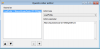
Hello, Like this: (in this screenshot you load profile named "(01-05)NightElf.xml" in folder "WRobot\Profiles\Quester\AllianceQuestsDroidz\". Remove "AllianceQuestsDroidz\" if your profile, is in base quest profiles folder.)
-
WRobot support now Wow PTR server (wow version 5.4.7 (17898)). More info
-
WRobot support now Wow PTR server (wow version 5.4.7 (17898)). More info
-
Hello, If you want try WRobot for Wow 5.4.7 (17898) (PTR server). To install WRobot for PTR server: To uninstall: PS: If you found bugs post report here please.
-
If you can try with new the WRobot update please. It is problem with decimal separator (in french computer is "," by default, in english is "."). Tell me if problem is solved or not. Thanks
-
IsFacing checking only if you facing your target (you can facing your target and your target can be in front or not of your character). If you facing your target and you have same rotation, you are inevitably behind it.
-
Hello, What is you Windows langage? Can you copy/past here first position (before bug). For the moment you can remove number after the ".". Thanks.
-
Hello, Can you send me screenshot please.
-
Yes but I want say, during combat, you can get 5 CP (you can launch manually "Crimson Tempest" by moment)?
-
-
Hello, You can found this option in advanced general settings. Teamviewer can cause problem to access at the keyboard, kill all teamviewer process, and teamviewer service process.
-
-
Bonjour, Vous pouvez supprimer le sort avec l'éditeur de fightclass, regardez le guide d'utilisation de WRobot (à la fin).
-
Hello, You use spells in your fightclass with less than 5 combo points (your spell Crimson Tempest required 5 combo points), your character has 5 combo points during combat?
-
Hello, The function IsFacing return true or false (boolean) all calcul is in function.