Droidz
Administrators
-
Joined
-
Last visited
Everything posted by Droidz
-
Wait update of wrobot and say me if problem is solved.
-
Hi, Thanks for report, I'll watch it.
-
Hi, When you create your profile you need to walk along of water. Send me your profile please I'll look it tomorrow.
-
Hi, Can you share your log please
-
Hi, Now fightclass spell (in editor) is ordered by priority (high priority to low priority). For changing priority, you need only to select spell and click on the button "Up" or "Down". Old fightclass is automaticly ordered. I have edit it for to improve the use. This update is old (03/17/2013, more info here: http://download.wrobot.eu/wrobot/bin/updateinfo.php).
-
I'll see that
-
Salut, Merci pour ce tutoriel. Je les déplacé dans le forum Français.
-
Hi, for get if character have totem the reply is here: And I haven't try but for launch totem just use spell name.
-
Hi, If problem persist can you share your log please.
-
Hello, Look this post: Try this macro in game for find overridden spell: /run for i=1,200000 do local f=FindSpellBookSlotBySpellID(i,"spell") if f then local n,id=GetSpellBookItemName(f,"spell"),select(2,GetSpellBookItemInfo(f,"spell")) local s=GetSpellInfo(id) s=n==s and " " or "\124cFF4FF763"..s print(id,n,s) end end Tell me if you have again problem
-
Hi, Do you have restart wrobot when you have reset your wow key binding?
-
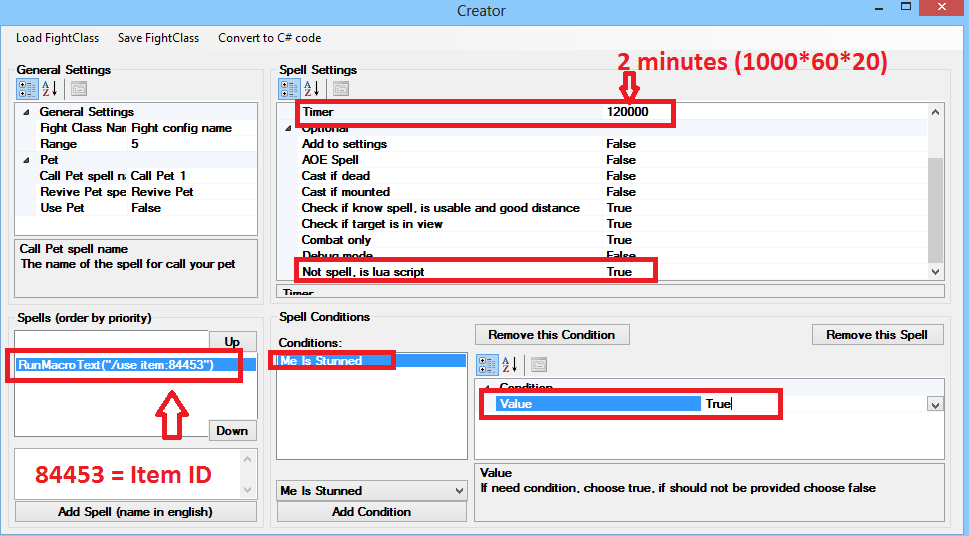
Salut, (remplace à gauche l'id de l'item, j'ai utilisé cette item: http://fr.wowhead.com/item=84453/medaillon-de-tenacite-du-gladiateur-effroyable )
-
Hello, I'll look it today, if it is bug I fix it today.
-
Hi, When you is not in donjons do you have same problem?
-
Hello, Try to reset your wow keybinding "Jump" and please share your log file (read this topic also: )
-
I have tried Metamorphosis without condition and this works fine. What conditions do you use?
-
I'll watch that, I come back to you after
-
I fix it in next update
-
Hi, For totem ( http://www.wowwiki.com/API_GetTotemInfo ) you need to use lua code: haveTotem, totemName, startTime, duration = GetTotemInfo(1) if (haveTotem) then retV = "1" else retV = "0" end For enchant weapon ( http://www.wowpedia.org/API_GetWeaponEnchantInfo ): hasMainHandEnchant, mainHandExpiration, mainHandCharges, hasOffHandEnchant, offHandExpiration, offHandCharges, hasThrownEnchant, thrownExpiration, thrownCharges = GetWeaponEnchantInfo() if (hasMainHandEnchant) then retV = "1" else retV = "0" end
-
Do you have lanched wow in 32 bit mode?
-
Hi, I'll watch it
-
You can also use this script for get spell id: /run for i=1,200000 do local f=FindSpellBookSlotBySpellID(i,"spell") if f then local n,id=GetSpellBookItemName(f,"spell"),select(2,GetSpellBookItemInfo(f,"spell")) local s=GetSpellInfo(id) s=n==s and " " or "\124cFF4FF763"..s print(id,n,s) end end
-
You can found spell id on wowhead (spell url). For this spell: http://www.wowhead.com/spell=588/mind-flay the id is 588
-
Hi, Thanks for your suggestions fall0ut, I have noted all. For movement in fightclass you can use this functions: http://www.wowpedia.org/World_of_Warcraft_API#Movement_Functions (lua function for wait: http://wowprogramming.com/forums/development/491 )
-
Hi, The flying deplacement can make occasionally problem. I'll work on it (but not immediately)