




Droidz
Administrators
-
Joined
-
Last visited
Everything posted by Droidz
-
Hello, Can you share your log file please ( https://wrobot.eu/forums/topic/1779-how-to-post-your-log-file-with-your-topic/ ).
-
Hello, sorry I'll not add more option in remote, but you can use program like teamviewer for that
-
-
Hello, in advanced general settings tab "Vendor" put value bigger at 0 in the option "Food/Drink Amount" and in tab "Food/drink..." put your food/drink name (don't forget to add vendor in your "NPC DB" (tab tools) or in your profile
-
Hello, too hard to add
-
If you can wait next update EDIT: To force to update completed quests list you can run this code: wManager.Wow.Bot.States.FinishedQuestsState.Do();
-
Sorry I cannot help you
-
Hello, I'll not add this feacture, but you can create plugin for that (and use wrobot event "wManager.Events.InteractEvents.OnInteractPulse")
-
If you can try with last update
-
Changed Status to Confirmed Changed Version to All
-
Hello, sorry I'll not add this feature (this will use too many CPU/Memory/Time)
-
Hello, I'll not add thisHello, https://wrobot.eu/files/file/428-wait-party/Hello, in advanced general settings tab "Vendor..." you have option "Food/Drink Amount"Hello, sorry I'll not add this feature.Changed Status to Confirmed Changed Version to AllYou can use the name in "GoToStep" (you can also use step number in GoToStep):
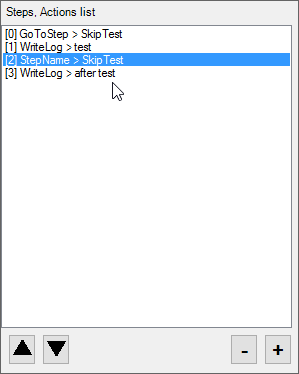
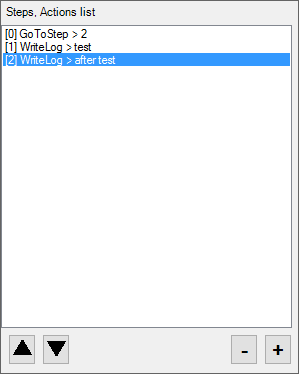 If you can tell me if problem is resolved with last wrobot updatecan you also send me your profile (by private message if it is private profile), and your full log file. (and if someone else has this problem he does not hesitate to tell it)Hello, I'll obfuscate recipient name in log. And can you sendme screenshot when you are stuck


