Droidz
Administrators
-
Joined
-
Last visited
Everything posted by Droidz
-
Hi, Try to reset your wow key binding "Sit/Down" (put X).
-
Hi, I'll add possibility to use fightclass creator without wrobot launched.
-
Hi, No for the moment
-
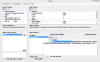
Hi, Wait the next wrobot update and try with this condition:
-
Hi, Reply here:
-
-
Hello. I'll starting work on quester bot. I have only one question, what is the best way for create profiles for you (graphical interface is not possible)?
-
Wait the next update and say me if problem is solved.
-
Hi, If you activated "For Friends" option on an spell, wrobot replace target conditions (sample: "Target Health Percent" converted to "Friend Health Percent"). WRobot check conditions on each members of group (order by health), when one member of group has all conditions at true, wrobot target member and launch spell (don't forget to add spell range condition (Target Distance)).
-
Hi, What Flight Form do you use?
-
Hi, I have tried and works fine for me, no looting problem. If someone can try and tell me if he has this problem.
-
Yes is controlled by package manager, and changing size of file not ask update (package update is request only when I update zip file on server) .
-
Hi, Use this lua script in wow chat: /run for i=1,200000 do local f=FindSpellBookSlotBySpellID(i,"spell") if f then local n,id=GetSpellBookItemName(f,"spell"),select(2,GetSpellBookItemInfo(f,"spell")) local s=GetSpellInfo(id) s=n==s and " " or "\124cFF4FF763"..s print(id,n,s) end end You need to use this spell for Frost Strike: http://www.wowhead.com/spell=45902 (as explain here: )
-
Hi, I add pet buff in next update
-
Hi, Currently they miss digsite zones in pandaria. You need to add manualy ( ) or wait update. If you add zones, can you share your database with me please ( data/Digsites.xml ) Thanks.
-
Hi, If you problem is not solved say me exactly what do you want (the number of unit and the radius). I'll you give solution and try to explain.
-
Hi, I'll see for bg/grinder. And you can keep wow on backdrop but no minimized (in taskbar). (use wow in window mode)
-
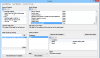
Try to use this Fight Class (or add this at your fight class) I cannot test it because I don't have this item. test-Anglers Fishing Raft.xml
-
Hello, I do not add lifetime license sorry.
-
Hi, Can you update wrobot and say me if you have again problem please.
-
Before click on button "Update/Reinstall" you need to select in list package, for you select "Base data - admin - Need update" and click after on "Update/Reinstall" button.
-
Update wrobot, problem solved.
-
Hi, I'll see. Thanks
-
Hi, I'll watch it.
-
Hi, only for actual stacks