Talamin
Elite user
-
Joined
-
Last visited
-
-
-
-
-
 Talamin reacted to a post in a topic:
Matenia's HumanMasterPlugin, all Fightclasses and experimental projects for later expansions, including a Quester
Talamin reacted to a post in a topic:
Matenia's HumanMasterPlugin, all Fightclasses and experimental projects for later expansions, including a Quester
-
-
-
-
 I had the pleasure to be part of the development team behind this product and all i can say: It´s indeed amazing!!! We were able to push several teams from 15-72 over the last months, just by looking at them. The Botbase is by far the most sophisticated Product i have seen for wrobot, and it took several months to bring this into it´s current state. Beside the product itself, all the profiles were polished which are shipped with it. Believe me when i say that i have personally seen the caverns more then any other dungeon in WoW 🙂 There are some things implemented which are not mentioned here, because it would go too far and too deep, but just try it and give feedback.
 -
-
-
-
-
-
Talamin reacted to a review on a file:
[Free] Project Wholesome - WOTLK Fightclasses (all 10 included)
-
-
-
Deserved 5/5 Stars for this! Nice and clean Tutorial, thx for this! 🙂
-
-
-
-
Ouroboom reacted to a comment on a file:
[Free] Project Wholesome - WOTLK Fightclasses (all 10 included)
-
-
-
 hm, can you try just to use it? don´t think that this will be a huge problem for the FC.
- 281 comments
- 29 reviews
-
Sure, do the right settings in wrobot. This is not FC related! Tick the „use drink“ option in your settings.
- 281 comments
- 29 reviews
-
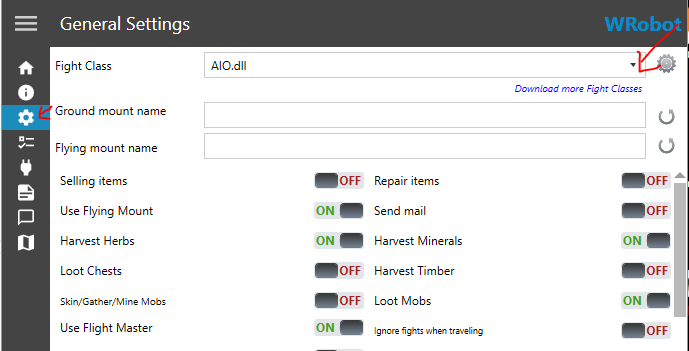
Hi, just download the one you like and put it in the FightClass Folder inside your wrobot installation. Then you can start your bot. After logging into it, press on the third button on the left and choose through the Dropdown on the right side your Fightclass.
-
-
 The holy Grail! Thx for your hard work… I followed the complete process and it was a looooooooong way to go… but this project is damn awesome! Thx for your hard work 🥰
- 35 comments
- 13 reviews
-
-
- 2
-
-
Thx for the Feedback. The AIO is still a bit clunky here and there. And since it has Grinding/Dungeon Rotations included it has sometimes problems in Lowlevels for Priest. ProtPally will have manaproblems in the early levels but you will see that they become a total beast after a certain level. If you have ideas or suggestions, feel free to join our discord and give Feedback.
- 281 comments
- 29 reviews
-
You are using waypoints which are recorded for Groundmounts and you try to enter a cave or entrance or building, the bot beging to start spazzing out when you try to use a flying mount. Just use a ground mount and you are good to go. Old Problem which exists a loooooong time.
-
You can send me a Log in DM and describe your problem pls as good as possible. I’m sure we can fix this if it’s a wrong behavior of the FC 😊
- 281 comments
- 29 reviews
-
this AIO is suited for Grinding, Questing and 5 man Dungeons (normal). No Raid or PvP. So he Roations are not top notch, that´s true, but at the moment there is no option to change the Rotation, sorry.
- 281 comments
- 29 reviews
-