Droidz
Administrators
-
Joined
-
Last visited
Everything posted by Droidz
-
If you can send me by PM you crash file please.
-
Thank you, Wait next update and tell me if problem is resolved.
-
Hello, what product and what fightclass do you use for the arenas? Sorry, you cannot look corps in bg.
-
Hello, WRobot will not work with a boxer. You can use the product "party" if they are on the same server and in the same group (but not compatible with quests at the moment, I would add it one day). To do quests, the only solution at the moment is to launch wrobot several times with the "Quester" product and use the same profile (but the group are not supported).
-
Just for the test, you can try to put min latency at 1000 and max at 1500 and tell me if this resolved problem. Do you use wow addon? if you you can try to disable all.
-
Hello, I am not sure to understand exactly what you want, but you can use code like this: int numberOfEliteNearTank = ObjectManager.GetWoWUnitHostile().Count(u => u.Position.DistanceTo(tank.Position) <= u.InteractDistance && u.IsElite && UnitCanAttack.CanAttack(u.GetBaseAddress, tank.GetBaseAddress)); if (numberOfEliteNearTank >= 3) { // .. }
-
Hello, To stop to go to tank if it is out of view you can use this code: #region Tank too far bool tankfar() { WoWPlayer tank = getTanks().First(); while (tank.IsValid && tank.GetDistance > 15 && !wManager.Wow.Helpers.TraceLine.TraceLineGo(tank.Position)) { MovementManager.MoveTo(tank); System.Threading.Thread.Sleep(50); } MovementManager.StopMove(); return false; } #endregion To generate path and go to tank you can use code like this: #region Tank too far bool tankfar() { WoWPlayer tank = getTanks().First(); if (tank.IsValid && tank.GetDistance > 15) { wManager.Wow.Bot.Tasks.GoToTask.ToPositionAndIntecractWith(new WoWUnit(tank.GetBaseAddress), -1, false, context => Conditions.InGameAndConnectedAndAliveAndProductStartedNotInPause && tank.GetDistance > 15); } MovementManager.StopMove(); return false; } #endregion
-
-
Use Portals To use portails, you can look this sample: UsePortal.xml (guide is written in the first step).
-
Change WRobot settings You can change WRobot settings with step type "RunCode" like this: Disable "Stop bot if player teleported" (to avoid problem with you use Hearthstone or portals): wManager.wManagerSetting.CurrentSetting.CloseIfPlayerTeleported = false; To disable "attack before being attacked": wManager.wManagerSetting.CurrentSetting.AttackBeforeBeingAttacked = false; ... (to get names of settings, you can edit file with nodepad "WRobot\Settings\General-..........xml")
-
Hello, Yes, I cannot detect new spells without restart wow client, I don't know cause yet (this problem do not exist on the wotlk official server before). I have add it to my to do list, I'll look it again, I comeback here when is done.
-
Hello, problem resolved.
-
Hello, Can you share the profile used please? (problem is probably caused by an c# code in the profile)
-
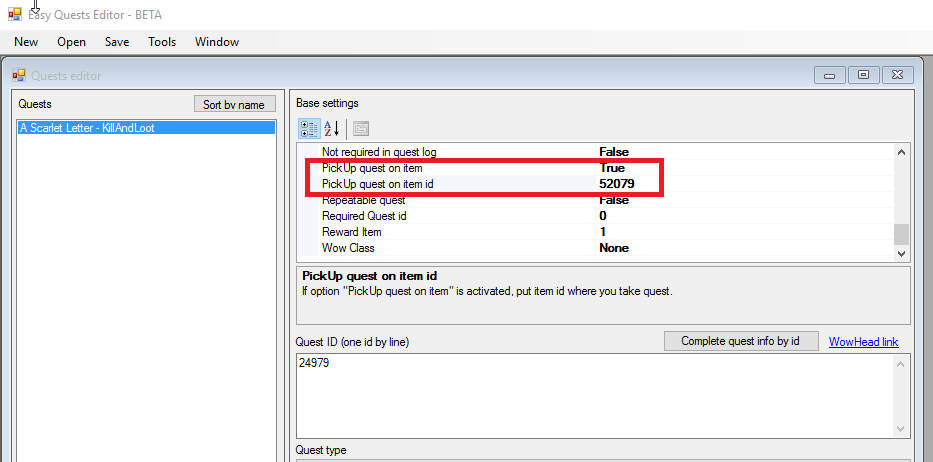
Starting quest from items (picked up)
-
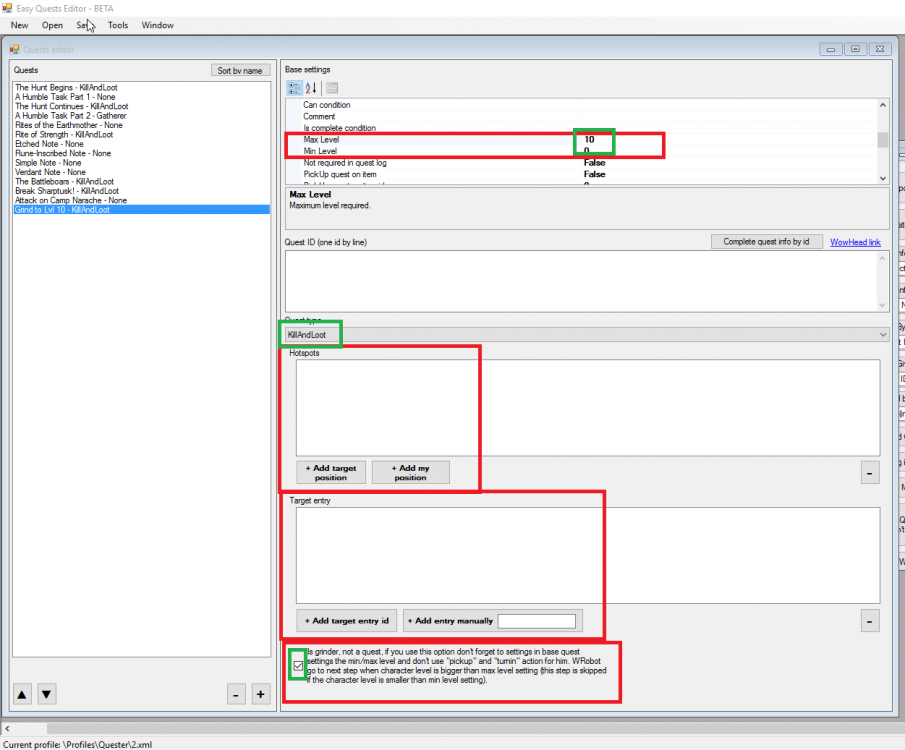
Add grind area (don't forget to give a name at this "Quest" and add in the steps a step type "Pulse")
-
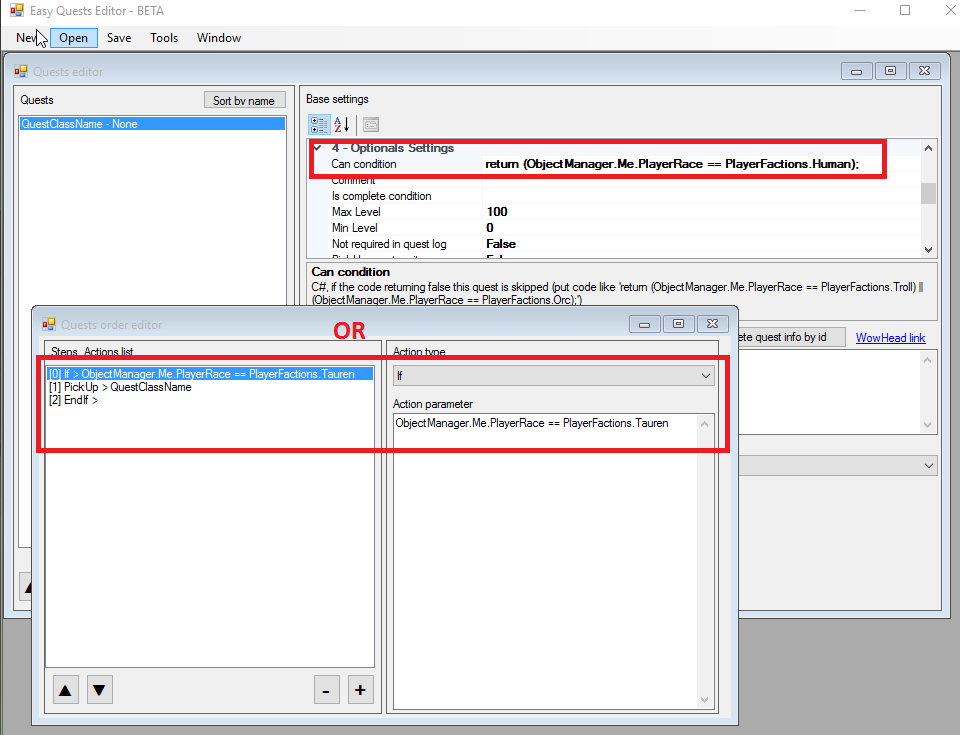
Quest by race Two possibilities:
-
 Hello, very good job, thank you. To clear quest log you can look this: http://wrobot.eu/forums/topic/2681-snippets-codes-for-quest-profiles/?do=findComment&comment=12203
 -
Force to use Flightmaster / Taxi WRobot takes the taxi automaticly generally, but if you want force to use taxi you can look this sample: UseFlightPath.xml (guide is written in the first step).
-
Use item on hostile weakened mob Add step type "PickUp" (put quest name in parameter) Add step type "RunCode", in parameter put this code: Thread t = new Thread(() => { uint itemId = 62899; int questId = 28000; while (robotManager.Products.Products.IsStarted) { if (Conditions.InGameAndConnectedAndAliveAndProductStartedNotInPause) { if (!Quest.HasQuest(questId)) break; if (ObjectManager.Target.IsValid && ObjectManager.Target.IsAlive && ObjectManager.Target.HealthPercent <= 25) { ItemsManager.UseItem(itemId); } } Thread.Sleep(500); } }); t.Start(); (you need to have quest in your questlog, you can replace "62899" but the item id, "28000" by the quest id and "25" by the max target health) Add step type "Pulse" (put quest name in parameter) (use quest type kill or interact) Add step type "TurnIn" (put quest name in parameter) (sample if based on this quest: http://www.wowhead.com/quest=28000/do-the-imp-possible )
-
Quest log cleaner Abandon all quests Add step type "RunLuaCode" with code: for i=1,GetNumQuestLogEntries() do SelectQuestLogEntry(i); SetAbandonQuest(); AbandonQuest(); end Abandon quest by quest id Add step type "RunLuaCode with code (replace 12345 by the quest id at abandon): local questId = 12345; for i=1,GetNumQuestLogEntries() do local _, _, _, _, _, _, _, id = GetQuestLogTitle(i); if id == questId then SelectQuestLogEntry(i); SetAbandonQuest(); AbandonQuest(); end end
-
Snippets codes for quest profiles ps: Feel free to share your tips on this post. If your message is poorly presented or contains a question, it will be deleted.
-
Hello, can you tell me if you get this problem with new update.
-
Hello, if "reduce input lag" option don't resolve your problem, can you try to launch wrobot with NoFakeCallStack.bat (download and move this file in wrobot folder, double click on it to launch WRobot) (if wow crash again, if you can send me wow crash files by private message).
-
Hello, I will not add this, (There is an option almost similar of this "Ignore fighting during farm if in druid form" (in advanced general settings tab Looting...).
-
Hello, disconnection appear only in bg? If you can share log of sessions where your get this problem.