




reapler
Elite user
-
Joined
-
Last visited
Everything posted by reapler
-
I also noticed that the event with gcd lock sometimes react slow. But this works fine for me: public void Pulse()//pulse every 50ms { if (Target.HealthPercent <= 95) { new Spell("Flash of Light").Launch();//waitIsCast is true => no pulse while casting Logging.Write("cast done\nwait 5 seconds"); Thread.Sleep(5000); Logging.Write("let it pulse again"); } Logging.Write("pulse"); } or if you don't want to block pulse and only want to lock the spell cast: private bool _folCast; public void Pulse() { if (Target.HealthPercent <= 95 && !_folCast) { _folCast = true; Task.Run(delegate { new Spell("Flash of Light").Launch();//waitIsCast is true => the task have to wait while casting Logging.Write("cast done\nset _folCast to false in 5 seconds"); Thread.Sleep(5000); _folCast = false; Logging.Write("_folCast is set to false"); }); } Logging.Write("pulse"); } Of course it needs more checks to the cast, but you get the basic idea. The used initialize method: public void Initialize() { _isLaunched = true; Logging.Write("Loaded"); while (_isLaunched) { try { if (Conditions.ProductIsStartedNotInPause) { Pulse(); } } catch (Exception e) { Logging.WriteError(e.ToString()); } Thread.Sleep(50);//lower values will cause rather double casts } } If you use Task.Run for other stuff, ensure it won't trigger multiple times in a loop. If it's still double cast in your fightclass, you should check your routine flow while running.
-
-
-
 GoToClick - a WRotation plugin This plugin enables the user to move to a location by a click on the Wow map. To move on, just hold ctrl and click! Note: - The plugin itself is a port from another bot credits can be found in the file. - The plugin doesn't support travel to other continents(api limitations), but supports typical actions like using taxi or unstuck. - The plugin requires the latest version of WoWDb to work! It can be obtained here.
 -
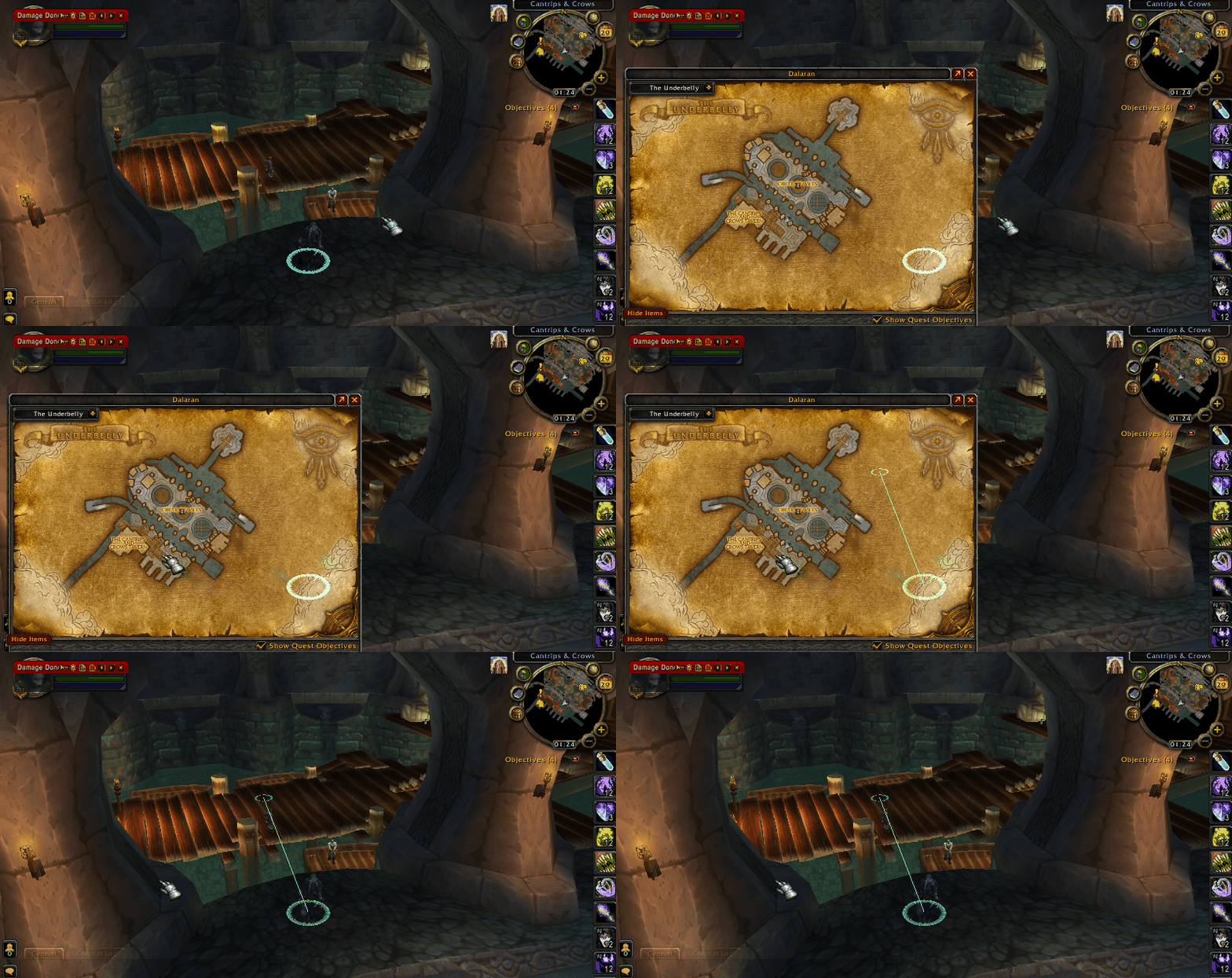
Yes, the result is good :) I just added my height + 20: Thank you.
-
Hello, i'm developing currently on a click to move tool for the wow map. But i noticed that the .FindZ(); method isn't able to retrieve the height of dalaran, it returns the height of Crystalsong Forest. Yes it's working, no doubt, but is it possible to get the z position on dalaran instead of Crystalsong Forest? (the clicked position on the map is on "The Underbelly")
-
Hello, i would like to suggest to include the latest builds from https://github.com/MahApps/MahApps.Metro, https://github.com/MahApps/MahApps.Metro.IconPacks to the WRobot library folder in" WRobot\Bin\". The reasons why it should be included would be: -developer can build a beautiful gui for the fightclasses / plugins without to embed it with costura or any other tool(smaller file size) -many additional templates are ready to use -the iconpack includes several icons for any usage which can be also picked from the tool -it's regulary maintained -wpf designer recommend it for creating metro designes & apps I hope you consider this option, since it would be great to develop a professional gui while maintaining the file size small. I would also create small tutorials aswell example projects for the usage with WRobot. Best regards
-
I've altered your second snippet, because it threw some errors: if (GetCVar("HuntersMarkDisabled") == nil) then RegisterCVar("HuntersMarkDisabled", "default") end if (GetCVarBool("HuntersMarkDisabled")) then SetCVar("HuntersMarkDisabled", 0 ); DEFAULT_CHAT_FRAME:AddMessage("enabled frame: HuntersMark"); else SetCVar( "HuntersMarkDisabled", 1 ); DEFAULT_CHAT_FRAME:AddMessage("disabled frame: HuntersMark"); end But since you are using only lua, i think there's a better solution but lua is not my favorite language ;) Maybe someone else can other offer a better answer.
-
Hello, i think you would like to also connect to C#? So you can use this: Lua.LuaDoString(@" if (GetCVar(""frameDisabled"") == nil) then RegisterCVar(""frameDisabled"", ""default"") end if (GetCVarBool(""frameDisabled"")) then SetCVar(""frameDisabled"", 0 ); DEFAULT_CHAT_FRAME:AddMessage(""enabled frame""); else SetCVar( ""frameDisabled"", 1 ); DEFAULT_CHAT_FRAME:AddMessage(""disabled frame""); end "); After each call it will be changed. And the returned values can be used by a fightclass. In lua just replace the double quote to one quote and add your code.
-
Well, you can use these methods to check your unit: /// <summary> /// Used to get the main hand weapon of an unit. /// </summary> /// <remarks>Using 3.3.5a(12340) offsets.</remarks> /// <param name="unit">The unit.</param> public int MainHandId(WoWUnit unit) { if (unit.PlayerControlled) return wManager.Wow.Memory.WowMemory.Memory.ReadInt32(unit.GetDescriptorAddress(0x4E4)); return wManager.Wow.Memory.WowMemory.Memory.ReadInt32(unit.GetDescriptorAddress(0xE0)); } public bool IsDisarmed(WoWUnit unit) { return unit.UnitFlags.HasFlag(UnitFlags.Disarmed); } public bool IsHumanoid(WoWUnit unit) { return unit.CreatureTypeTarget == "Humanoid"; } As you can see you need for the main hand id different offsets, which are for wotlk(maybe it works for other expansions). Please note that the id will still be returned for player characters even when shapeshifted or disarmed. If a npc / player doesn't carry a weapon, it will be zero. I think it should suffice to build a properly check for disarm.
-
-
I've changed the keys to press & the string to search. It should work now. The requirements to use it successfully are: Wow.exe on foreground(it can reset the key on window switch) and the item must be in cache.
-
-
-
Hello, i've created a small example for this, everything else is explained in the comments: using System; using System.Collections.Generic; using System.Threading; using wManager.Plugin; using wManager.Wow.Class; using wManager.Wow.Enums; using wManager.Wow.Helpers; using wManager.Wow.ObjectManager; using static robotManager.Helpful.Logging; public class Main : IPlugin { #region Variables private bool _isLaunched; private int _msDelay = 200; private DateTime _unlockTime = DateTime.Now; private readonly HashSet<string> _noGcdSpells = new HashSet<string> { "Counterspell", //... //http://wowwiki.wikia.com/wiki/Cooldown => Abilities noted for not affecting nor being affected by the global cooldown: }; #endregion #region Properties public bool GcdActive => DateTime.Now < _unlockTime; #endregion #region WRobot Interface public void Initialize() { var pGuid = ToWoWGuid(ObjectManager.Me.Guid); EventsLuaWithArgs.OnEventsLuaWithArgs += delegate(LuaEventsId id, List<string> args) { if ( id == LuaEventsId.COMBAT_LOG_EVENT_UNFILTERED && args[2] == pGuid && !_noGcdSpells.Contains(args[9]) && ( args[1] == "SPELL_CAST_SUCCESS" || args[1] == "SPELL_HEAL" || args[1] == "SPELL_DAMAGE" ) ) { Write("lock"); _unlockTime = DateTime.Now.AddMilliseconds(_msDelay); } }; _isLaunched = true; Write("Loaded"); while (_isLaunched) { try { if (Conditions.ProductIsStartedNotInPause) { Pulse(); } } catch (Exception e) { WriteError(e.ToString()); } Thread.Sleep(30); } } public void Dispose() { _isLaunched = false; } public void Settings() { } #endregion #region Pulse public void Pulse() { var spell = new Spell("Lesser Heal"); if (!GcdActive && spell.IsSpellUsable && !ObjectManager.Me.IsCast && ObjectManager.Me.TargetObject.HealthPercent <= 90 ) { spell.Launch(false, false); //will cast the heal if "_msDelay" was passed } /* if (spell.IsSpellUsable && !ObjectManager.Me.IsCast && ObjectManager.Me.TargetObject.HealthPercent <= 90) { spell.Launch(false, false); //.IsSpellUsable is true after gcd was passed but the heal itself can delay //and cause double heal cast if no additional delay is added like above //so ObjectManager.Me.TargetObject.HealthPercent <= 90 would be true for a short time }*/ } #endregion #region Methods public string ToWoWGuid(ulong guid) { var wowGuid = ObjectManager.Me.Guid.ToString("x").ToUpper(); var c = 16 - wowGuid.Length; for (var i = 0; i < c; i++) { wowGuid = "0" + wowGuid; } return "0x" + wowGuid; } #endregion } if you are going to lower the tickspeed this will rarer happens, but it can still happen. Instant spells aren't included.
-
-
Hello, since you are using vanilla i assume the method doesn't work correctly but i'm not sure("DoString" is obfuscated). You also can't use the "/use <item>" it wasn't implemented on vanilla. So you need to iterate the items in your bag with lua. I tried this on 3.3.5a but since the used api functions is also present on vanilla, it should also work: public void UseItemByName(string name, bool lootItem = true) { if (lootItem) { Task.Run(async delegate { robotManager.Helpful.Keyboard.DownKey(wManager.Wow.Memory.WowMemory.Memory.WindowHandle, System.Windows.Forms.Keys.ShiftKey); await Task.Delay(2000); robotManager.Helpful.Keyboard.UpKey(wManager.Wow.Memory.WowMemory.Memory.WindowHandle, System.Windows.Forms.Keys.ShiftKey); }); } wManager.Wow.Helpers.Lua.LuaDoString( @" for b=0,4 do for s=1,GetContainerNumSlots(b) do if (string.find(tostring(GetContainerItemLink(b,s) or """"), """+wManager.Wow.Helpers.ItemsManager.GetIdByName(name)+@""" )) then UseContainerItem(b,s, onSelf); end end end " ); } Usage: UseItemByName("Hearthstone", false); or UseItemByName("Heavy Crate", true);
-
-
-
Yes, it will be public. At first only for 3.3.5a then i'm going to continue working on my database for other versions.
-
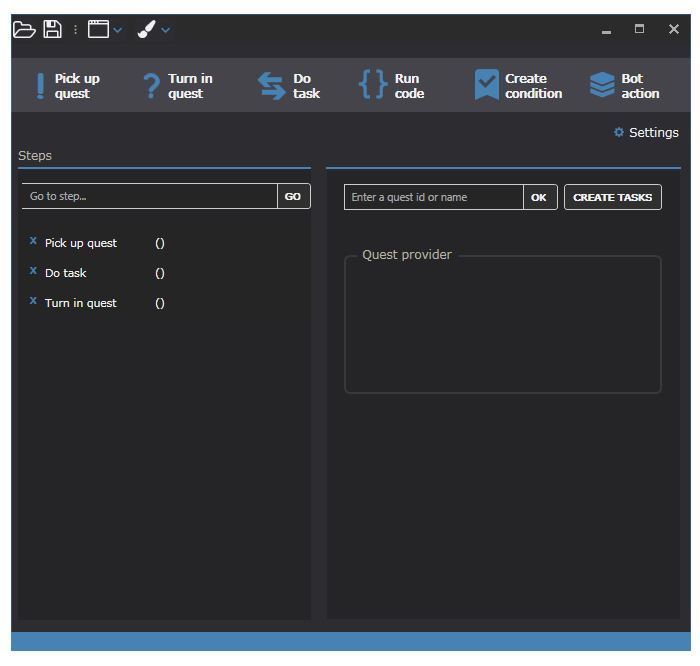
A small update from me: Since i'm almost done with the database, i can continue working on my editor again. But my first design wasn't really good. I'm thinking to use a more simpler solution which doesn't require to assign a "Action parameter" at the sorted quests. In the end each action define a step which are selectable on the bar like this: By the way, if you have a custom pulse like "KillAndLoot", "Gatherer" or something else which is often used, you are welcome to post it and i can create a seperate setting gui for it.
-
Hello, i've created a small example how to use the c# code: heal.xml Because reactions are ordered you can use it like this: wManager.Wow.ObjectManager.ObjectManager.Me.TargetObject.Reaction > Reaction.Neutral
-
Hello, @scripterx i really recommend to use c#. Pqr / only lua is limited in many ways. According to your posts, i guess you only want to cast specific spells by a button press only if x condition is met. So in this case you could do it like this in a plugin(i know it could be better > copy-pasta from my other posts): using System; using wManager.Plugin; using wManager.Wow.Class; using wManager.Wow.ObjectManager; public class Main : IPlugin { public void Initialize() { robotManager.Helpful.Logging.Write("Register OnEventsLuaWithArgs"); wManager.Wow.Helpers.EventsLuaWithArgs.OnEventsLuaWithArgs += delegate (wManager.Wow.Enums.LuaEventsId id, System.Collections.Generic.List<string> args) { if (id != wManager.Wow.Enums.LuaEventsId.EXECUTE_CHAT_LINE || ObjectManager.Me.IsStunned) return; var toCast = new Spell("Riptide"); if (args[0].ToUpper().Equals(("/cast @target " + toCast.Name).ToUpper()) && ObjectManager.Me.TargetObject.HealthPercent <= 90) { toCast.Launch(false, false, false, "target"); } if (args[0].ToUpper().Equals(("/cast @player " + toCast.Name).ToUpper()) && ObjectManager.Me.HealthPercent <= 95) { toCast.Launch(false, false, false, true); } }; } public void Dispose() { } public void Settings() { } } In-game you can just create a macro like this: #showtooltip Riptide /cast @target riptide So it will only cast the spell, if target is under 95% health. More related stuff can be found here. Otherwise you can do it on an automatic way in a rotation: using System; using System.Threading; using System.Windows.Forms; using robotManager.Helpful; using robotManager.Products; using wManager.Wow.Class; using wManager.Wow.Helpers; using wManager.Wow.ObjectManager; public class Main : ICustomClass { public float Range => 30f; private bool _isLaunched; public Spell Riptide = new Spell("Riptide"); public void Initialize() // When product started, initialize and launch Fightclass { _isLaunched = true; Logging.Write("[My fightclass] Is initialized."); while (_isLaunched) { try { if (!Products.InPause && !ObjectManager.Me.IsDeadMe) { Pulse(); } } catch (Exception e) { Logging.WriteError("[My fightclass] ERROR: " + e); } Thread.Sleep(10); // Pause 10 ms to reduce the CPU usage. } } public void Dispose() // When product stopped { _isLaunched = false; Logging.Write("[My fightclass] Stop in progress."); } public void ShowConfiguration() // When use click on Fight class settings { MessageBox.Show("[My fightclass] No setting for this Fight Class."); } public void Pulse() { if (ObjectManager.Me.Target != 0 && Riptide.IsSpellUsable && Riptide.IsDistanceGood && Riptide.KnownSpell && ObjectManager.Me.TargetObject.HealthPercent <= 95) { Riptide.Launch(); } } } You can also combine them & use settings for automatic / manual usage and do whatever you want: The possibilities are endless. Using a state engine is also possible. More informations can be found here. If you need help, feel free to ask.
-
-



