




Droidz
Administrators
-
Joined
-
Last visited
Everything posted by Droidz
-
-
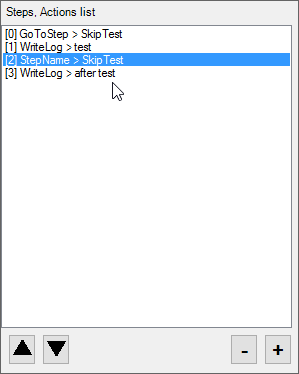
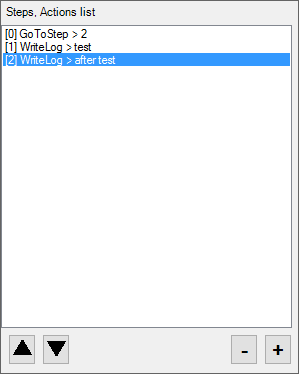
You can use the name in "GoToStep" (you can also use step number in GoToStep):
-
If you can tell me if problem is resolved with last wrobot update
-
can you also send me your profile (by private message if it is private profile), and your full log file. (and if someone else has this problem he does not hesitate to tell it)
-
Hello, I'll obfuscate recipient name in log. And can you sendme screenshot when you are stuck
-
-
Hello, sorry but I cannot fix that
-
Hello, this can happen sometimes, if you can add 2 check like: if (Conditions.InGameAndConnected && ItemsManager.GetItemCountByNameLUA("item name") == 0) { System.Threading.Thread.Sleep(200); if (Conditions.InGameAndConnected && ItemsManager.GetItemCountByNameLUA("item name") == 0) return true; } return false;
-
Hello, add this to your fightclass:
-
Hello, In your profile add this action https://wrobot.eu/forums/topic/2202-profile-positions-and-action-column/ : c#: wManager.Wow.Helpers.NpcDB.AcceptOnlyProfileNpc = true; Do you use wow addons? If yes try to disable all. Can you share your fightclass
-
Hello, can you read this: https://wrobot.eu/forums/topic/1381-repairinstall-wrobot/#comment-966 (try to disable your antivirus and reinstall in new wrobot in new folder, try to close skype and teamviewer and reinstall framework) If you problem is not resolved, can you share your log file please ( https://wrobot.eu/forums/topic/1779-how-to-post-your-log-file-with-your-topic/ ).
-
Hello, wait next update and tell me if problem is resolved
-
With next update, use relogger app will resolve problem
-
Hello, wait next update, wrobot relaunch wow 2 minutes
-
Wait next update
-
Hello, if you can wait next update and tell me if problem is fixed
-
Ok, for problem with relogger and settings wait next update
-
Hello, with code like: string s = wManager.Wow.Helpers.ItemsManager.GetItemSpell(5514); if (!string.IsNullOrWhiteSpace(s)) { bool isUsable = wManager.Wow.Helpers.SpellManager.SpellUsableLUA(s); }
-
-
Hello, no sorry, more similar plugin for that is https://wrobot.eu/files/file/512-loot-statistics/ (you can also search in wow addons)
-
Hello, not option for that, but if you use "Gatherer" bot you can use product option "Use flying mount at all times"Hello, can you share screenshot of you food settings (in advanced general settings)You get all time this log: 19:50:28 - "[Farming] Still moving! - Please verify if your key binding "Sit/Move Down" is assigned." Try to disable your wow addons and try to reinstall wrobot, select only your profile (don't use fightclass and ...) to test if WRobot worksHello, wait next update, I improved combat detection with others players and added option to ignore all combat with players.

