gh0stfac3
Members
-
Joined
-
Last visited
Everything posted by gh0stfac3
-
I've given up botting on netherwing. There gm's monitor all people leveling. If you even play legit and look like a botter I'm sure they will ban you.
-
Hey droidz, that was the issue thx for some reason thought my tbc fight class would of worked.
-
So I got banned in netherwing for botting. Im trying kronos now and after 30sec to 1 min im getting this crash im getting some getspell lua error then wow just crashes with the error 132. Im using bambos 1-70 grinder and some paid ret pally fc.
-
bot not starting for me also.
-
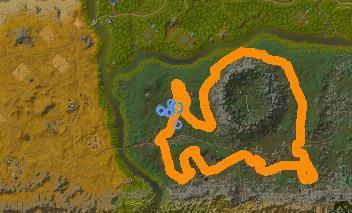 worked really well. started at herb 65 skill was slow at the start as you can only farm mageroyal but as soon as you hit 75 to farm [Briarthorn] it sped up and then 125 skill for [Kingsblood] took 3-4 hrs fully afk to go from 65-150. thanks
 -
 Looking forward for the 1-40 version this worked great
 -
purchased image fight class works perfect i just want it to be able to use [Zandalarian Hero Charm] on cooldown when in combat how do i do this?
-
So I've made a decent EPL herb route not quite fully AFK but 90% still have to monitor it. I was wondering if anyone has some decent dreamfoil/plaguebloom/icecap/blacklotus ect ect profiles i would be willing to buy with some money. I can even do a trade for my EPL profile. It's mainly Plaguebloom let me know thanks
-
Any way to make bot skip specific herbs for eg. Arthas' Tears have heaps of stacks but there not selling atall. how do i make bot skip that herb and not farm it? Much help greatly appreciated
-
thank you sir
-
Just been leveling my fishing and socializing in the guild and talking to friends and the game auto closed because I received 10 whispers is there anyway to disable this feature?
-
Bot use to mount flying mount and fly up inside the house and get stuck seems to be fixed.
-
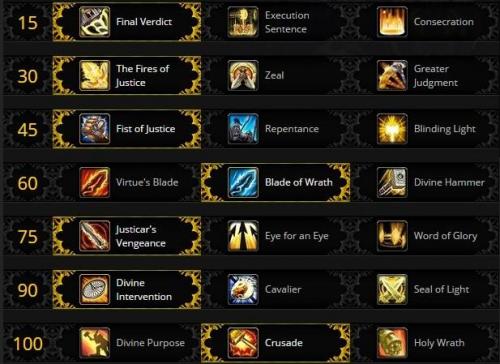 im getting an issue where its constantly standing out of range and not attacking targets. only judgement them. other than that its working great
- 5 comments
- 3 reviews
-
old version still works am i at risk?
-
 thanks for this. please note when doing this grind make sure to check LFG as there are many groups made for this and will speed up your mana grind heaps.
- 9 comments
- 3 reviews
-
Stumbled upon this route on reddit. How hard would it be to profile this. Here's the link
-
 lvl 110 Warrior PVE ARM's Fight Class Perfect for grinding profiles (leather farming). Uses "shockwave" and "Warbreaker" (artifact ability) Have not tested on char's below level 100, I do not suggest using this for PVP as it doesn't use Hamstring. Uses whirlwind, bladestorm on 2 or more enemys uses overpower also. takes on 4-5 enemy's at once with ease. "die by the sword" is activated when @ 40% hp or below. I run this on my 813ilvl warrior oviosuly the better geared you are the quick stuff dies. Let me know if have any dramas with this. Many thanks to "thejm" for his pvp version. this is merely just an updated pve version of that.
- 1 review
-
-

- 1
-
-
-
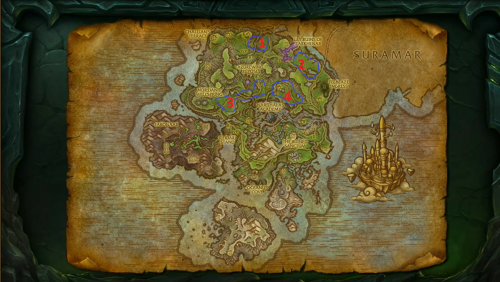 works great, leveled my warrior from 100-110 i run this enchant on gloves and my 110 bodyguard champion works well
- 19 comments
- 8 reviews
-
Bro this works awesome. Biggest fail on my behalf tho I forgot to turn off mammoth selling and bot sold around 2k leather and greens and lost them all fuck!
- 19 comments
- 8 reviews
-
-
- 1
-
-
-
-
what talents should I be running with this? thanks for this leveled me 70 very well
- 28 comments
- 6 reviews
-
-
- 1
-
-
-
thanks for the quick updates